Tuesday, 31 May 2011
Here are the steps
which will help
you to recover
your deleted Gmail
Contacts :-
1. Login to your Gmail account.
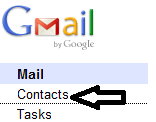
2. Once you have logged in,
go to Contacts.
3. In Contacts, go to More
actions->Restore
contacts …
4. When the Restore
Contacts window pops up, select a time to restore to
and hit Restore. Please note
that you can only restore
deleted contacts within the past 30 days.
5. After that, you will see a notification on the top of Gmail's user interface. You can click on Undo to
rollback the change


