Wednesday, 1 June 2011
GPRS HUB |

- Forget 3G,turn towards 4G
- HOW TO RECOVER DELETED Gmail CONTACTS
- SUPERB IP TRICK FOR DOCOMO 3G Users
- Hide Your Online Status on Facebook Chat from Select Contacts
- How to Display Facebook Statuses on WordPress Blog
- Create Photo Collage/Grid-View Of Your Facebook Friends
- How to "Friend" Someone on Facebook & Hide It From Your Status Updates
- How to Place Facebook Chat On Firefox Sidebar
| Posted: 31 May 2011 09:05 PM PDT Telenor's chairman Harald Norvik and CEO Jon Fredrik Baksaas announced the opening of world's northernmost 4G/LTE network in Longyearbyen. The LTE test launch adds to a number of "northernmosts" most northerly domestic fiber services, northernmost 2G, 3G, satellite station, and other ground-breaking records. Around 1900, when industrialization and mining industry was starting to take off in the Arctic, Svalbard was increasingly becoming attractive to various nations and great powers. On May 3, 1911, the Norwegian parliament agreed that a radio telegraph station was to be built on Svalbard. The station was named Spitsbergen Radio and originally built in Green Harbour linking Svalbard to the Norwegian mainland. The city and the inhabitants of Longyearbyen have, on several occasions, served as a test bed for Telenor's implementation of technological improvements and new services.  In spite of their remote location, today's inhabitants of Longyearbyen are taking advantage of the latest in technology in their daily lives – such as interactive IPTV, fiber to the home, Triple-Play, and mobile broadband. 
|
| HOW TO RECOVER DELETED Gmail CONTACTS Posted: 31 May 2011 09:12 PM PDT  which will help you to recover your deleted Gmail Contacts :- 1. Login to your Gmail account. 2. Once you have logged in, go to Contacts. 3. In Contacts, go to More actions->Restore contacts … 4. When the Restore Contacts window pops up, select a time to restore to and hit Restore. Please note that you can only restore deleted contacts within the past 30 days. 5. After that, you will see a notification on the top of Gmail's user interface. You can click on Undo to rollback the change 
|
| SUPERB IP TRICK FOR DOCOMO 3G Users Posted: 31 May 2011 08:47 PM PDT hello friends!!  Handlar software like opera,ucweb,bolt,snaptu,ebuddy and so on.. Than Open it leave all fields blank than in "Use Proxy" select HTTP & in Proxy server type "121.241.249.212″ OR ''202.65.157.201'' than initialize it it will initialize.. Both surfing and downloading possible with good speed of 15-20 kbps NOTE:Use default Dive In settings balance must be above 1rs. 
|
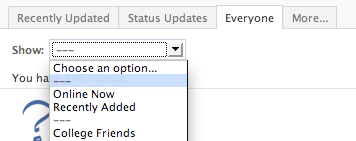
| Hide Your Online Status on Facebook Chat from Select Contacts Posted: 31 May 2011 08:22 PM PDT Create free stunning slideshows from your travel photos. Start now! If you are connected with too many people on Facebook and need to hide your online status on Facebook Chat from certain contacts, here's some help.  Facebook has integrated friends list with Chat and you can also choose which of these list members get to see you online.  So you can stay visible to your family members and close friends while the rest of your Facebook friends won't know if you are logged into Facebook. Earlier you had to completely turn of ur fb chat in order to hide your online status from other contacts. The Facebook chat window has easy sliders so you can easily toggle your online status for any friends list in a click. 
|
| How to Display Facebook Statuses on WordPress Blog Posted: 31 May 2011 09:41 AM PDT 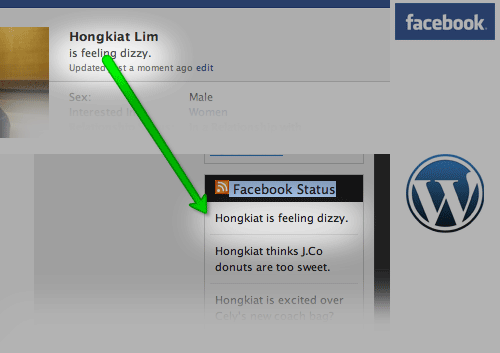 If you want to show your Facebook Statuses and you are hosting on a WordPress.com blog that restricts you from installing plugins, try this. The following method make use of Facebook status feed and WordPress RSS widget. It will also work for self-host WordPress blogs, but you guys who self-host can use better plugins for that. Step 1Login into Facebook. Under Profile, look for Mini Feed column, click on See All.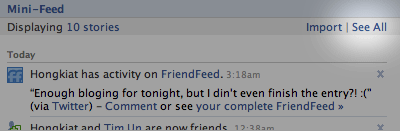 Step 2Under Mini Feed, click on 'Status Stories' on the right column. Scroll all the way to the bottom, look for 'My Status'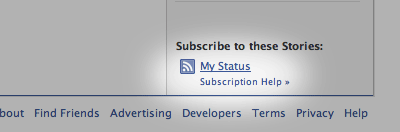 Step 3Copy the link of My Status, and we are about to use this in WordPress blog. Your link will look something like the following: Step 4 (WordPress)Under WordPress admin, Navigate to Design -> Widget. Look for RSS Widget, add it to your side bar.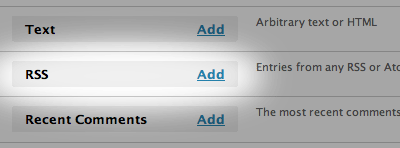 Step 5Paste the copied URL inside, give it a name, save and your Facebook statuses (or status depends on how many you display) will now appear on your WordPress blog.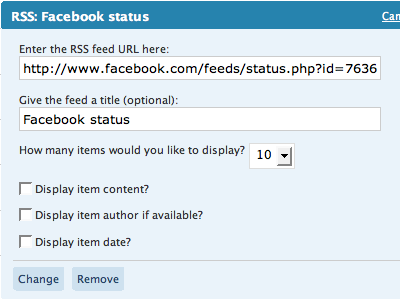 
|
| Create Photo Collage/Grid-View Of Your Facebook Friends Posted: 31 May 2011 09:36 AM PDT 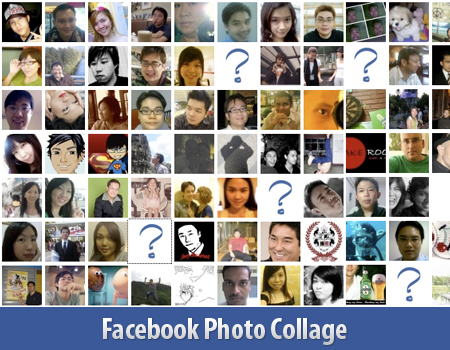 Here's a small little trick in Facebook that allows you to create a grid view or photo collage out of your friends list. This is how I do it:
Photos of all your friends will be displayed, each in 50×50 pixels forming a grid view. Have fun. 
|
| How to "Friend" Someone on Facebook & Hide It From Your Status Updates Posted: 31 May 2011 09:34 AM PDT  I'm sure that this has happened to you before. Someone you have ties to, whether it's a co-worker, your boss, or even worse, a parent, has finally discovered social networking and wants to be your newest Facebook friend. I'm sure that this has happened to you before. Someone you have ties to, whether it's a co-worker, your boss, or even worse, a parent, has finally discovered social networking and wants to be your newest Facebook friend.For me personally, that's no big deal. I'm fairly open about my online activities. Everything I write, Digg, or otherwise share goes through my FriendFeed to my Twitter then ultimately onto my Facebook (my, that sounds naughty). Besides that, just about everyone I'd consider a co-worker is already on Facebook, and would have little issue about my other Internet activities. Putting all that aside however, imagine for a moment that I worked at Domino's Pizza and that I don't want my boss to know that I just became a fan of Papa John's (writing this one's gonna make me hungry). Here's what I would do to hide Facebook status updates and keep that fact confined to my closer friends: On your Facebook home page, you should see the 'Settings' menu close to the search field on your upper-right. Open that menu and go to 'Privacy Settings'.   In my example, you're going to want to edit the setting on your Status Updates, since you don't want your boss to know that you've "fanned" the competition. Click that dropdown menu and then select 'Customize'.  
|
| How to Place Facebook Chat On Firefox Sidebar Posted: 31 May 2011 09:29 AM PDT Facebook Chat is cool, at least it allows you to send instant messages to online Facebook contacts. However I'm not really a fan of the chat bar being at the bottom of the page, what if I've left Facebook but still wants to remain chatting with my Facebook contacts? If you are using Firefox, you can place the Facebook Chat at the sidebar. Step 1Look for Bookmarks on the top navigation. Select Organize Bookmarks…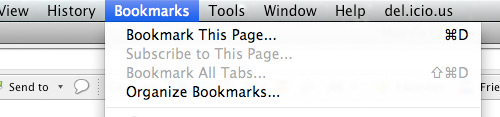 Step 2Click New Bookmark... tab and enter the following:
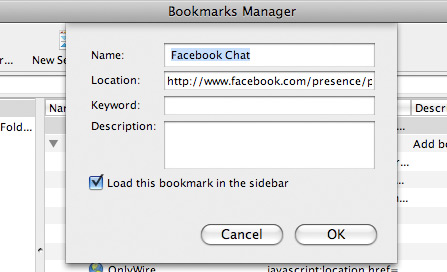 Step 3Launch the Firefox sidebar, click Facebook Chat and start chatting with your Facebook contacts within Firefox.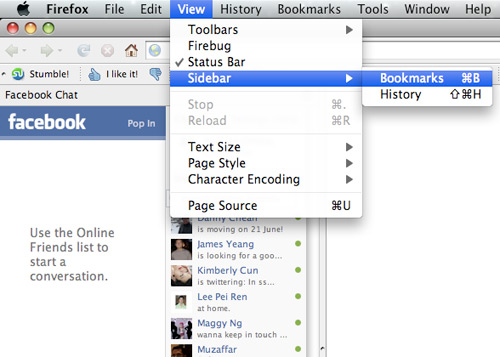 
|
| You are subscribed to email updates from A free gprs tricks AIRTEL ,RELIANCE,DOCOMO,VIDEOCON,UNINOR 2011 To stop receiving these emails, you may unsubscribe now. | Email delivery powered by Google |
| Google Inc., 20 West Kinzie, Chicago IL USA 60610 | |


