muhaimenkm.blogspot.com/ |

- Facebook Hacking Exclusive Trick 2011 Working
- HTC Sensation enters India
- Cricket Fever hits mobile phones with great New Apps
- How to Flood someone Facebook Wall
- BSNL launches VPN over WiMAX (VPNoWiMAX), announces attractive Tariff
- INCREASE SPEED OF TATA DOCOMO GPRS
- Nokia E6 is now available for Pre-order
- Vodafone (Chennai & Tamil Nadu) launches East STD Bonus Pack
- 160by2 HANDLER FREE SMS SOFTWARE JAVA
- Partition a Drive Without Losing Data
- Customize Drive Icons
- iPhone Paid Applications Direct Download
- Send Fake SMS With Others Mobile Number
| Facebook Hacking Exclusive Trick 2011 Working Posted: 17 Jun 2011 06:55 PM PDT Today, I am writing another article/method of hacking Facebook account useful for those whose victim does not check his/her emails regularly. This time we will use the Password recovery feature of Facebook. I have given all the details of hacking Facebook account in the article below. Please move further. Pre-requisites for hacking Facebook Account Password: Facebook has introduced a feature of using "Recovering password using Trusted Friends". In this feature, if we have lost our Facebook account password, Facebook will send the security code to 3 friends. We have to ask those 3 friends for the security codes and after entering them, we can reset Facebook password. So, in this hack, we will use this feature for hacking Facebook account password. So, you have to create 3 fake accounts and make sure that your victim adds them as his friends. So, your 3fake accounts must be listed in your victim's Friends list. Now, if we use the above "Trusted friends" feature for resetting victim's Facebook password, Facebook will send the security code to our 3 fake accounts and we can easily hack Facebook account.You can use Socialengineering skills so that your victim will have no doubt while accepting your fake account as his friend. This is the only tricky part of the hack. Also, the fake accounts must be at least a week old. Once you are done with fake accounts, move to the steps below:- Hacking Facebook Account Password in 5 Steps:- So, let us start with the steps for hacking Facebook account password:- 1. Go to Facebook.com and hit on Forgot Password link to get this page:       Thus, you are successful in hacking Facebook account password of your friend. Note: The victim will be emailed about the password change. So, this method of hackingFacebook account is useful only for those whose victim does not check emails regularly. I hope you now well approached with this method of hacking Facebook account password. Just make sure that the victim will add your fake accounts as his friend. This is the only tricky part of this Facebook hack. If you have any problem in this method of hacking Facebookaccount password, please mention it in comments. Enjoy method of hacking Facebook account password…  |
| Posted: 17 Jun 2011 06:51 PM PDT 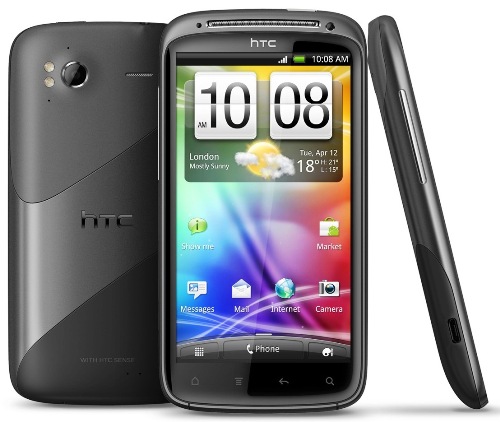 HTC has launched their most high-end multimedia smart phone in the Indian market today. The HTC Sensation, is truly a sensational handset packing some amazing hardware and software capabilities. We were at the official launch in New Delhi, and were shown presentations by HTC and Qualcomm highlighting the device's details, the processor capability and the 'Augmented Reality' concept. We also tipped in some info that the HTC Flyer tablet might be heading to India in a week or two, but it is unconfirmed news. HTC has launched their most high-end multimedia smart phone in the Indian market today. The HTC Sensation, is truly a sensational handset packing some amazing hardware and software capabilities. We were at the official launch in New Delhi, and were shown presentations by HTC and Qualcomm highlighting the device's details, the processor capability and the 'Augmented Reality' concept. We also tipped in some info that the HTC Flyer tablet might be heading to India in a week or two, but it is unconfirmed news.So the Sensation has a nice and big 4.3 inch capacitive display with a stunning 540x960 qHD resolution. A dual-core 1.2GHz Qualcomm Snapdragon processor and 768MB of RAM makes the device super-fast, responsive and have some amazing UI capabilities. The device has 3G, Wi-Fi, Bluetooth, DLNA, GPS, Micro USB, and a 3.5mm stereo audio jack. It also supports microSD cards upto 32GB. The rear camera is an 8MP snapper with dual LED flash and can record full HD videos at 1080p and the front camera has VGA resolution for making video calls. The Sensation runs Android 2.3 Gingerbread with HTC's latest Sense 3.0. The new HTC Sense Experience has a very nice 3D layout with multiple home-screens and some quality widgets. The weather widget is one of the most amazing widget as it not only tells you the weather, but changes the screen through animation according to the weather outside. Other than the usual apps, HTC has launched HTC Watch, which is a video app comprising of TV shows and Movies that can be viewed on demand. The handset also boasts the concept of 'Augmented Reality' which in short is bringing the real world to your smart phones and integrating the two. "The technology offered by HTC is unique and revolutionary which symbolizes the spirit of innovation and inventive genius. HTC Sensation™ will create a paradigm shift in the overall Smartphone category with a refreshingly brilliant experience. In a market that is cluttered with many confusing options, we aim at offering a solution that solves our day-to-day requirements with simplicity and convenience," said Mr Faisal Siddiqui, Country Head HTC India. The handset is priced at Rs. 32,700/- Specs: - 4.3 inches S-LCD capacitive touchscreen with 540 x 960 pixels and 16M colors - Gorilla glass display - Accelerometer sensor for UI auto-rotate - HTC Sense v3.0 UI - 3.5mm audio jack - 1 GB internal storage memory with 768 MB RAM - up to 32GB expanable memory with 8 GB card included - 3G connectity HSDPA speed upto 14.4 Mbps and HSUPA 5.76 Mbps - Proximity sensor for auto turn-off - Wireless LAN with DLNA and Wi-Fi hotspot - v3.0 Bluetooth with A2DP - microUSB v2.0 - Digital compass - 1080p@30fps Full HD video recording with stereo sound recording - VGA Front facing camera - TV-out (via MHL A/V link) - 1.2 GHz dual-core processor with Adreno 220 GPU and Qualcomm MSM 8260 Snapdragon - Standard battery with Li-Ion 1520 mAh with Up to 350 hours standby backup and Up to 8 hours 20 min Talk time - Stereo FM radio with RDS - Android Operating System version 2.3 (Gingerbread) - A-GPS support with Google maps - Gyro sensor - YouTube, Google Talk, Picasa integration - 8 MegaPixel primary camera with 3264×2448 pixels, autofocus, Geo-tagging, touch-focus, image stabilization, face detection and dual-LED flash  |
| Cricket Fever hits mobile phones with great New Apps Posted: 17 Jun 2011 06:50 PM PDT  Cricket madness the world over never sees a low and always there's one series following another to give cricket lovers a action packed season of international cricket. While Indian cricketers battle it out with their Caribbean counterparts publishers and broadcasters keep running at full speed trying to cover the 3 screens of media available to cricket lovers. Television sets are constantly tuned into matches and post match coverage. Desktops and browsers feed scores, trivia, interactive quizzes and contests to cricket fanatics. Mobile phones, not to be left behind, have received their fair share of cricket attention with over a 100 new applications for score keeping, gaming and social cricket functionality being made available for every device available. The most popular are score keeping applications where people on the move or at places without televisions or computers can track how their favorite teams and players fare. India vs West Indies Cricket Tour developed by Apps 4 Mobile is a skill-based cricket game. Use your knowledge of the game, and your rating of the teams, to predict various possibilities: who will win the featured match, who will score the most runs or get the most wickets - the possibilities are endless. Get India vs West Indies live scores, schedules, latest cricket news, team and player stats and predict outcomes to win amazing prizes like LCD TVs etc. Cricket Companion from Companion is the ideal mobile application for cricket enthusiasts and occasional followers alike, it provides live ball by ball updates of all international cricket games along with providing squads lists, player's statistics and batting/bowling graphs. Affle comes up with a unique application called Dressing Room. A misleading name, but well thought out features, Dressing Room offers the latest T20 cricket gossip, post match party coverage & dressing room secrets. The application promises masala news on teams, owners and players with interesting trivia and special zones. Cricket Forever developed by Mauj is one amazing game where you can choose teams and play a complete game of cricket against a opposition. Crisp graphics and nice game play make up for a nice cricketing time. Cricket Club By Nazara Technologies is another scorecard app which has detailed score cards, ball by ball commentary, match and series schedules, player profiles and best of all a detailed set of graphs including wagon wheels. Cricket Alarm by Twist Games gives an alarm before the start of every cricket match, handy for those who have a tendency to forget the fixtures. Cheerleaders from Aims Migital lets users play fantasy with cheerleaders and watch them in different dresses with the world's most popular Vuvuzela sounds in the background. AxeGoogly from TechShastra is a funny, entertaining and utilitarian application where users can view cricket match scores, play a swashbuckling cricket game, view match schedules and set reminders or even have their own personal assistant to remind them on various occasions. The Official ESPN Cricinfo app works on literally any handset including the current top selling Android Handsets. Being an official ESPN app, you can expect great features and quick score keeping. Those in the market looking for something different will find Space Cricket by Mauj very interesting. Users can play cricket with the best robots from different galaxies, they can win the coveted title of Galaxy Champion. For children and young adults, Cartoon Network presents CN ToonCricket by Nazara Technologies a game lets users play as Johnny Bravo or as the Power Puff Girls on the grassy green turf. Depending on handsets and operating systems, these applications are available on different app stores. Since all these applications and games are free, they're all available on Mobango.com. Mobango's app store supports nearly every handset ever made and adds more handsets every day. While cricket will always be popular, seasons and tournaments come and go and these applications promise to keep cricket lovers engaged in their favorite sport in the time in between. This article is written by Mr. Pushkar Chitale, Developer Community Manager, Mobango.com  |
| How to Flood someone Facebook Wall Posted: 17 Jun 2011 06:54 PM PDT Someone annoyed you? Wanna get revenge? Flooding his or her Facebook wallposts might be a good idea. But how to do it? So in this tutorial I'll be showing step by step tutorial on how to flood someone Facebook wall just with a simple JavaScript coding.  Note: This tutorial is only for education. I'm not responsible for any harm that may follow. Use at your own risk. Actually, there are a lot of way to flood someone wall. But in this tutorial, I'm only gonna show you the easiest way which is using JavaScript. If you still wanna know the other ways, just Google for it. First of all, log in to your account or you can create new fake account so you would not get caught. Now navigate to your victim wall. In this tutorial, The victim will be my fake account which I just created. Copy the script below and paste it on the URL bar. Next, you just need to press "Enter".  Wait for a while and a box will popup. Fill in the amount of flood. In this case I choose the message to be posted 10 times. Next, press "OK" button to continue.  A second box will popup and asked you to fill in the message you wanna post. Just putwhatever you like to flood your victim wall post. Now hit the "OK" button to start the flooding process  Wait for a few seconds and refresh the page and check your victim wall. You will see the result. As the proof, you can see the image below.  Enjoy. Note:- Please do not post too much messages because Facebook maybe will ban your account  |
| BSNL launches VPN over WiMAX (VPNoWiMAX), announces attractive Tariff Posted: 17 Jun 2011 06:47 PM PDT  BSNL has introduced VPN over WiMAX facility under its WiMAX service. Right now BSNL is only offering this service under Postpaid plans only. Here are the details VPN over WiMAX Tariff Tariff of VPNoWiMAX for e-Governance and other projects of Central /State Government :  Terms and conditions: Tariff of VPNoWiMAX for General as well as Enterprise customers: 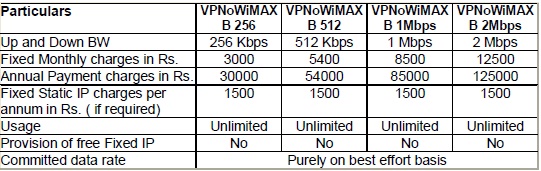 Terms and conditions:  |
| INCREASE SPEED OF TATA DOCOMO GPRS Posted: 17 Jun 2011 06:54 PM PDT Hello Guys..... this is the trick to increase ur speed in ur already activated 2g gprs plan... 1.dial *141# 3.now when you enter the amount for your pack...enter amount greater than ur balance..... supose u hv balance 10rs u must enter amt greater dan 10rs say u hv entered 90... 4.den u vl get a msg dat 'u hv insufficient balance'. Dats it nw ur speed vl be increased in ur phon n u vl get d speed as per ur 3g phone model.....  |
| Nokia E6 is now available for Pre-order Posted: 17 Jun 2011 06:48 PM PDT 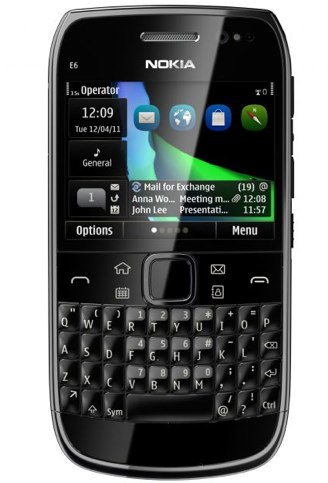 Nokia's latest Symbian Anna smart phone, the E6 is now available for pre-order in India. The handset is the first Touch & Type Monobloc design with full QWERTY by Nokia and it is now available at selected Nokia Priority Stores for demo, so customers can have an experience with the device before they can order one. The E6 is priced at Rs. 17,999/-. Customers can log on to www.nokia.co.in/E6, fill an online form and indicate their preference for the nearest Nokia Priority store. On receiving a call (within 24 hours) from the store, consumers can secure their Nokia E6 by depositing a booking amount of Rs. 2,000/. The handset is available in black, silver and white colour options. Key Features:  |
| Vodafone (Chennai & Tamil Nadu) launches East STD Bonus Pack Posted: 17 Jun 2011 06:44 PM PDT  Vodafone today announced the launch of the East STD bonus pack for its prepaid customers in Chennai and Tamil Nadu. Customers can now reach out to their near and dear ones in West Bengal, Uttar Pradesh, Bihar and Orissa using this offer at 30paise/minute. Customers can activate the East STD offer by dialing *121*28#. This offer is valid for calls made to both mobile and landline phone numbers in the East. The bonus pack can be availed at Rs 28 and is valid for 30 days.  |
| 160by2 HANDLER FREE SMS SOFTWARE JAVA Posted: 17 Jun 2011 06:41 PM PDT  As you all know 160by2.com is a site you can use to send free sms in India. 160by2 is a reliableSMS site which is similar to Way2sms.com and it has got more features. Send Free SMS to any mobile in India, Kuwait, UAE, Saudi, Singapore, Philippines & Malaysia for free using 160by2 now! HUI202 update: -Support Real Host header. -Back will discard changes. download handler version of 160by2 v1.1 hui202 Download:- http://plunder.com/95870ac50d  |
| Partition a Drive Without Losing Data Posted: 17 Jun 2011 06:40 PM PDT Wishes to partition your hard drives? But, partitioning a drive in windows will needed us toformat the drive. In this tutorial, I will teach you how to partition a drive without need to backup your data and format your drives. You might wonder if this trick need you to downloadsome softwares or tools. Do not worry because this trick is 100% download-free. We just gonna use a built in windows tool. This trick had been tested on Windows7 and Vista. I'm not sure that this trick will work onwindows XP. This trick allows you to partition any drive including system drives. Okay, first of all open Run dialog box ( Start > Run ). Type in "diskmgmt.msc" without the quotes in the text box. Wait until Disk Management window pop up. It may take a few seconds to load. After it's fully loaded, go to Storage > Disk management at the left sidebar. Now you could see a list of storage devices that are currently connected to your computer. Now choosethe drive that you want to partition. Right Click on it and select "Shrink Volume" option from menu.  The system will search for available space in your selected disk volume. A window will pop up asking you to wait while it loads. This will not take much longer than few seconds. Next the Shrink dialog box will pop-up. This is where you'll have to specify the volume for next partition. Look at the total size of available shrink space. Below it, you'll have to enter the space to shrink.  To make sure that you not losing any data, shrink size is not below the total size of space taken by files in that drive. You can check the used space by right clicking on the drive you are going to partition and choose "Properties" from the menu.  After done shrinking your drive. You can see an unallocated space in your shrunk drive. But you'll still not able to access this new drive. You'll have to format it and specify the drive letter to access them. Right click on unallocated drive and choose "New Simple Volume" option.  New Simple Volume Wizard Window will pop up. Click on "Next" button to continue. In next window, you'll have to specify the size for your new volume. Set full size if you are satisfied with two partitions or you can divide it again for new partition. Next, choose any drive letter from the available list and click on "Next" button. In next window, leave everything as default but make sure it's similar to the screen below ( If you want to change the volume label, feel free to do it ).  Click on Finish window to complete the wizard. Go to My Computer and you can see your new drive. That is all. Hope this tutorial will help you. Enjoy.  |
| Posted: 17 Jun 2011 06:39 PM PDT Windows Explorer and My computer, Windows will assign a drive icon like Hard drive, CD/DVD, Removable media, etc. You may wish to customize the drive icon. For instance, you would like to bring Windows 7 hard disk icons to your Windows XP. In this article we will explain you step by step guide to change the drive icons in Windows quickly by using free utility "My Drive Icon".  1. Download My Drive Icon. 2. It is a zip file. Extract the content and double click on "DI.exe" file in it . 3. My Drive Icon application gets launched. Select the icon file by clicking the browse through icon. You need to have icon file. Icon files are usually in .ico format. 4. In the programs interface, use the drop down list to specify the drive whose icon you want to change. 5. Enter a label as desired. For example "Movies". You can now preview the new icon. 6. Click "Apply changes" button. Now open explorer and refresh it to see the new icon in place of old drive icon. Any time you feel that you want the old icon back, just select the drive and click "Restore Defaults" to revert to previous icon.  |
| iPhone Paid Applications Direct Download Posted: 17 Jun 2011 06:28 PM PDT Here are some paid applications for your iPhone for Free just use the below links to downloadall the parts and simply select and extract all @ one place and than just install it on your iPhone. You need to Jailbreak your iPhone for the installation. List of Applications in the Package .:Crime.And.Punishment.by.Fyodor.Dostoevsky.v1.0-Brill301.ipa |
| Send Fake SMS With Others Mobile Number Posted: 17 Jun 2011 06:26 PM PDT Fake Sms is a fun way to prank out with your dearest friends. Well this should only be used fora limited access to play with your Homies but some can take advantage of this technique and f*** everything up by pranking and making problems for others. With this trick you would be able to send Fake SMS from anyone's number, Yes that's right you can put your friends enemy number and send him a message. You can do anything but remember this is just for educational purpose any illegal attempt can be taken as a serious crime. Procedure for sending fake sms .: 1. Go to SMSGLOBAL 2. Now simply click the New User button below Login Credentials.  3. After successful sign up you will see the confirmation that code has been sent to your phone. 4. Now simply grab your registered mobile number and go to SMSGLOBAL.COM and put yourUsername and your Password which you received on your mobile number.  5. Now the above windows will just open in front of you simply click on Send SMS to Number. 6. Now you will be presented with this layout just enter the information as said in the image below. 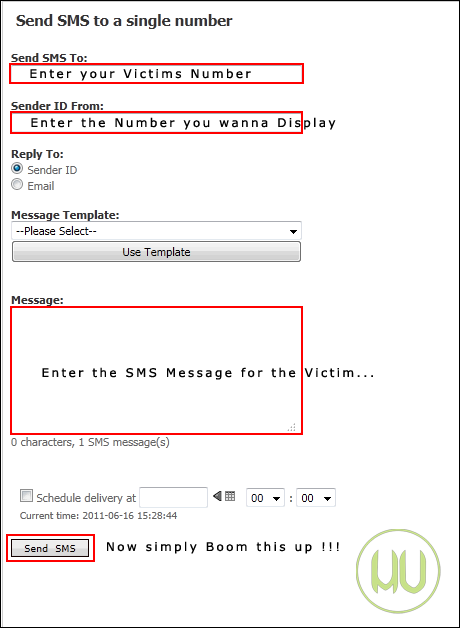 7. That's all you had successful a fake prank with your dearest friend so have fun with this service but don't make anyone cry with this service. Remember: you just have 25 sms credits if they are over then you need another mobile number to get more sms for free. So use these free credits wisely. If you like this article please +1 this post and Like to share it with your friends.  |


| You are subscribed to email updates from TRICKS ZONE To stop receiving these emails, you may unsubscribe now. | Email delivery powered by Google |
| Google Inc., 20 West Kinzie, Chicago IL USA 60610 | |


