| SpeedyFox: Firefox Speed Booster Posted: 20 Jun 2011 07:02 PM PDT Is your Firefox working slow. Does it opens in a lazy manner and slows down your work than we have a special tool for all of you SpeedyFox, is a simple utility which compresses all thesaved Firefox data hence making its speed a lot better. Whenever you install Firefox it always opens faster but as the days passes its files with huge data which makes Firefox slow so here comes the role of speedyfox to compress the data and make your Firefox faster and smoother. Features of SpeedyFox .:1. Boosting Firefox startup speed upto 3 times. 2. Boosting Browsing Speed. 3. Quicker Operation with Cookies. How to use SpeedyFox .:1. After Downloading SpeedyFox Run it. 2. You will a window like below just click on Speed Up My Firefox ! ( Remember Firefox should be close )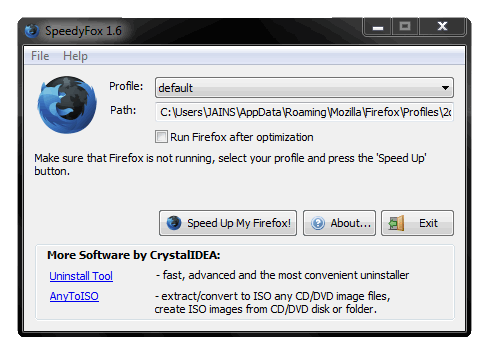 3. Now it will run its process and within sec it will complete and give you success message like below now just enjoy faster Firefox.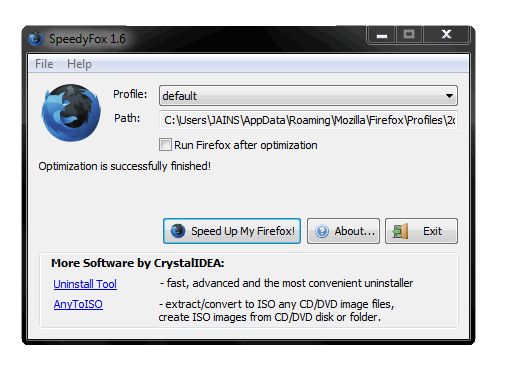  |
| Angry Birds and Angry Birds Rio for Android updated with new levels Posted: 20 Jun 2011 07:01 PM PDT 
The new updates for the original Angry Birds title and for the Angry Birds Rio are now available on the Android platform. You can easily update via the game or download an updated version from the web. The level for Angry Birds, called 'Mine and Dine' involves the pigs going in underground caves where the birds have to fight them and get their eggs back. The new update brings in 15 new levels for you to sling and enjoy. Angry Birds Rio also has a new update which brings in the 'Carnival Upheaval' round to the game. The birds along with Blu fight the monkeys through the Rio carnival. The hidden fruit is Papaya and getting them will win you a trophy in the trophy room. So start updating and start slinging some birds ! |
| Buy your Telephone instrument and get free calls from BSNL Posted: 20 Jun 2011 07:00 PM PDT  Though nowadays people don't use landlines much, but the state run operator, BSNL recently announced an offer for its prospective Landline customers. The offer is if you do not ask for an Though nowadays people don't use landlines much, but the state run operator, BSNL recently announced an offer for its prospective Landline customers. The offer is if you do not ask for an landline instrument from BSNL, and arrange it for yourself then BSNL will offer you 300 Metered Call Units (MCUs) free over & above the free MCUs available to the plan opted for by the subscriber. These free MCUs will be distributed equally in three billing cycles @ 100 MCUs per billing cycle and shall be applicable from 2nd billing cycle. So, if you are planning to get a landline connection, don't forget to take advantage of this offer. This offer is valid till 16th September 2011. |
| 25 Daily Free Backlinks For Your Website Posted: 20 Jun 2011 07:04 PM PDT Backlinks can help you increase your websites rank getting you on top in the search engine, which is really good for the SEO so today we will discuss about a free service called SocialMonkee it's a free service which helps you to make 25 backlinks to your websites content everyday.
The process is really simple just follow the below steps and you will through this service .:
2. Than Verify from your registered email address and move forward to SocialMonkee website.
3. Currently you are a free member that means you get 25 backlinks everyday and a limit of submitting 1 URL so that's not a problem for a free one so now you are on dashboard just click on Download Plugin/Submit like below .:
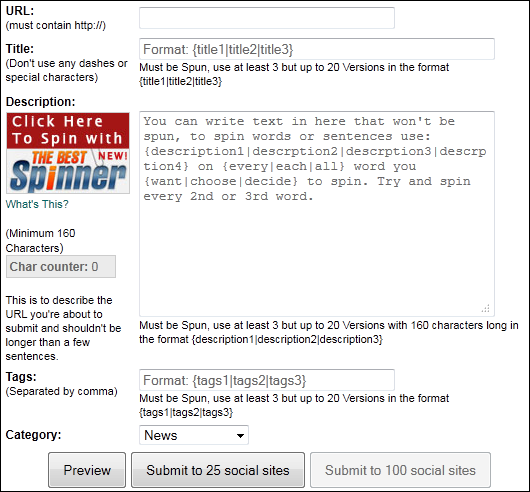
 . .4. Now you will see page like below just add all the information about the link you are submitting.
5. Add the title of the URL you are submitting, add the URL, and simply add Tags and description and category and click Submit to 25 social sites that's it not it will process your request and submit your URL within 24 Hours.  |
| How to use ‘Print Screen’ button? (PrtSc) Posted: 20 Jun 2011 07:04 PM PDT Many have asked me this question. In every computer key board, you will see this 'Print Screen' button. The basic functionality of this 'KEY' is to capture the snap shot (screen Shot) of the current screen you are viewing in your monitor and save it as an image file. It is like taking a photo of your monitor screen. Once you click this 'Print screen' button the screen image is captured and stored in teh clip board (computer memory). Then you can use the 'Ctrl + V' buttons together to paste it into any image processing software such as 'MS Paint', 'Adobe Photoshop' or any other Office applications such as Word, Excel or powerpoint. Once you paste it into any of these applications you can save it and then use the image later for any purpose. Here are the steps to use print screen feature.
- To capture the entire screen image from your monitor exactly as it looks, then in your key board look for the 'Prt Sc' button and click it once.
- Then as mentioned above, open any applications such as MS Paint etc and paste it. You can paste by pressing 'Ctrl + V' button together or using the 'Edit->paste' menu option.
- You will see the exact screen image inside the MS Paint application as an image.
- You can now, resize it, modify it if required and save it under any name you want for later retrieval.
- If you have opened more than one windows in the screen and you want to capture the snap shot of just one window and not the entire screen, then press 'Alt' key while pressing the 'Prt Sc' button. This will capture the image of the active window.
Ok now you have mastered the art of print screen. But why do you need this. The most common use of this feature is to capture 'Error messages' in applications for your support engineers to see later.  |
| LG officially announces the Optimus 3D Posted: 20 Jun 2011 06:55 PM PDT 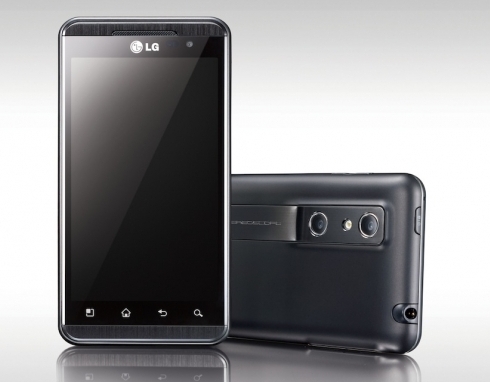 LG Electronics has officially launched the LG Optimus 3D. The new smartphone features a second generation dual core technology and an advanced Tri-Dual architecture – dual-core, dual-channel and dual-memory – which allows for improved performance when multi-tasking, enjoying a movie or playing graphics-intensive games. The LG Optimus 3D offers a full 3D experience in the smart phone package. LG Electronics has officially launched the LG Optimus 3D. The new smartphone features a second generation dual core technology and an advanced Tri-Dual architecture – dual-core, dual-channel and dual-memory – which allows for improved performance when multi-tasking, enjoying a movie or playing graphics-intensive games. The LG Optimus 3D offers a full 3D experience in the smart phone package.
LG's full 3D concept transforms 3D technology from a novelty to a practical tool. 3D recording, viewing and sharing is faster and more convenient in the Optimus 3D and can be enjoyed without cumbersome glasses. LG's latest smart phone enables owners to capture high quality 3D content with 3D video stabilization technology and real-time misalignment correction algorithm which automatically corrects for shake during recording. And the smart phone's wide viewing angle makes watching videos and movies much more convenient and comfortable.
"Tri-Dual architecture opens up a whole new world in smart phone performance," said Dr. Jong-seok Park, President and CEO of LG Mobile Communications Company. "As the latest offering in our Optimus line-up, we expect there will be significant interest from those who seek the very latest in smart phone technology and are excited about 3D as the next big frontier in mobile devices."
The LG Optimus 3D also incorporates the world's first 3D augmented reality (AR) browser in collaboration with AR pioneer Wikitude. The browser will be available through an app downloadable from LGWorld.
Here are the specifications and features of LG Optimus 3D:
- 1GHz Dual-Core Dual-Channel Texas Instruments processor OMAP4
- Glasses-free 3D 4.3-inch WVGA (800 × 480) touch screen display
- 8GB of memory and 4GB of DDR2 memory LP
- 5MP dual-lens camera
- 3D: 720p recording and playback H.264 SEI
- 2D: MPEG-4/H.264 1080p recording and playback
- HSPA+
- DLNA
- HDMI 1.4 ports
- Supports video formats: H.264, H.263, DivX, MKV, WMV-9, ASF, AVI, 3GP, MP4
- Google's Android operating system 2.2 Froyo
- 1.500 mAh battery
 |
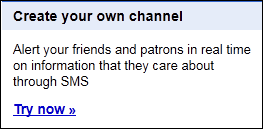
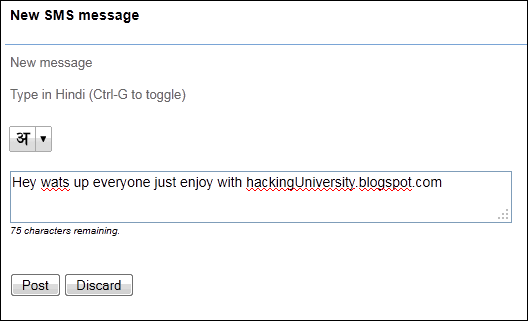
| Bulk SMS Service From Google Posted: 20 Jun 2011 07:03 PM PDT Google popularly known as the God of Internet and their services provides the best user experience like Gmail, Orkut, Blogger and many more free services so today I will tell about there another free bulk sms  service which used by many bloggers as a source for delivering rich content to all the people through the medium of sms. service which used by many bloggers as a source for delivering rich content to all the people through the medium of sms. So know coming back to this free service its really great you just have to create your own SMS Channel and then simply promote it to get more users on it Follow the below steps to create your own free bulk sms channel for free .: 2. Now simply sign in with your default Google account 3. After signing in just click on Try Now below Create your own channel like below .:
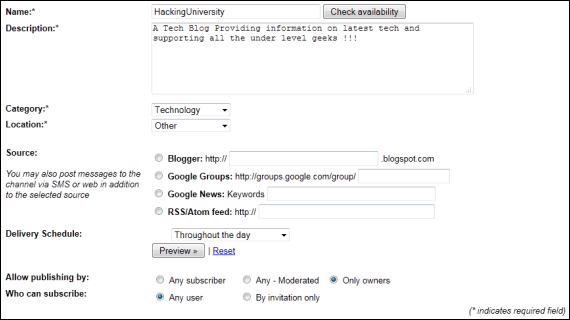
4. Now you will see a form to be filled like below .:
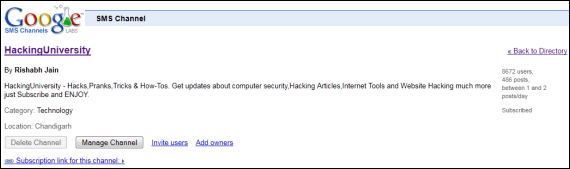
5. Just enter the name for the channel you want, then add the description about your channel, select a good category and tag a location for it. 6. The next says about the source that can be used like for a blogger service you have to link this to your blog address this works like whenever you publish some new stuff that'sautomatically gets shrinked and will be send to all the subscribers in your sms channel. 7. Now after messing up with all the information just check I accept user agreements and click on "Create Channel" 8. After you had created your channel you will be automatically taken into your channel you will have something like below .;
9. Click on the above image to enlarge it, now in the above image as you can see that on the right hand side you have users in the above image its 8672 you will have 1 user which is you yourself now don't worry just share your subscription link with your friends and tell them to subscribe to your channel.
10. You can click the subscription link for this channel to get your own subscription link.
11. Next step is to send sms, Below is the empty message box and a post button from there you can send sms to all your followers .: 1 Post = received by all subscribers.
12. Now you can make as many subscriber as you want and enjoy this free bulk sms service right from Google . Remember .: Sms length is 160 character and you can only send 3 Sms per day which is not good but think of like having 1,00,000 subscribers and sending 1 Sms being delivered to all of them is really Fun and Cost Free. So throw your opinions below in the comments section if you something new about this service, and simply enjoy this service.  |
| Computer Crash reasons Posted: 20 Jun 2011 06:51 PM PDT You may have heard of the 'Blue Screen of Death' but haven't experienced it yourself. It is better to know the reasons behind this crash so that when it happens you are in a position to fix it. If you see on the screen "Fatal error: the system has become unstable or is busy", "enter to return to Windows or press Control+Alt+Delete to restart your computer. If you do this you will lose any unsaved information in all open applications". This is the infamous blue screen of death. This could happen due to any of these following reasons:
- Hardware Problem: Computer consists of different hardware such as Printer, mouse, flash drive etc. Windows assigns an IRQ number for each of these hardware. When due to some reasons more than one hardware use the same IRQ this will result in a crash. In order to find if you have any hardware conflicts you can goto the 'Device Manager' in your computer properties. (Start-Settings->Control Panel –> System->Device manager), an yellow exclamation mark will be placed against the hardware that has a conflict. You can resolve this by selecting the device, uninstalling and reinstalling it again.
- RAM memory: When you upgrade RAM memory, if you have two unmatched RAM cards or a RAM card that is not compatible with your motherboard, then a "Fatal Exception Error" will occur when you start the computer. If you are technically savvy then you may try to fix this by going to BIOS settings and editing the 'Wait state' of RAM or you can replace the cards with the same speed and capacity.
- Hard Disk Drive: After using the computer for a few months or years, the hard disk gets fragmented with temporary files, or fragmented files. This will result in slowness of hard disk and may even result in computer crash eventually. You can maintain your harddisk by defragmenting your hard disk frequently and deleting unwanted files.
- Video Card: If you see "Fatal OE exceptions and VXD errors" then it is due to the video card. To solve this reduce the video display resolution. You can do so by going to the control panel and display settings. Choose the correct screen resolution to match your monitor and change the color settings to 16 bit or match it with your monitor.
- Virus: Most of the computer crash is due to Virus infection in your computer. You should install or enable windows firewall and install an Anti virus application to prevent unwanted virus applications infecting your computer.
- Printer: Sometimes you may notice that the computer crashes whenever you try to print something. This is due to low memory buffer in the printer. Therefore when you send a lot of data to the printer or if you have multiple applications open and you print at the same time, this may happen. Unplug the printer from power outlet for 10 minutes and connect back again. Close other programs and try to print again.
- Software: If a particular software is not installed properly or is not complete then it may result in a crash when you try to start that software. You have to uninstall such software properly. Otherwise some entries may still be in the registry referring to that software and result in instability of the computer. You can use registry cleaning software to clean your registries frequently.
- Heat: Computers have inbuilt fans to cool down the processors. You can control the CPU speed from your BIOS settings. If the speed is set to higher than the normal CPU speed, this may result in overheating of the CPU which will result in Kernel Error.
- Power Supply: Use UPS to regulate the power supply to your computer. This will reduce the chances of your computer crashing.
 |
| 75 Themes Pack For Nokia Posted: 20 Jun 2011 09:50 AM PDT Download best themes for your Nokia to make it more personalized and more attractivedownload the package from below link, after clicking the below link just click Skip Ad after 5 sec. 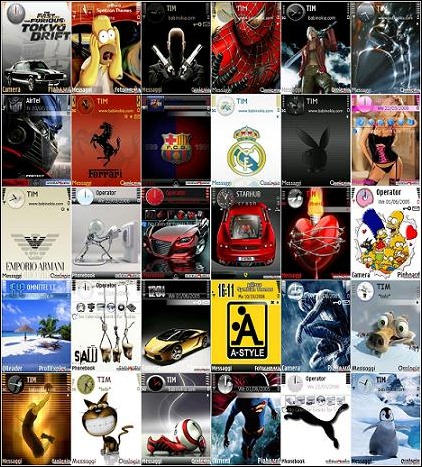  |
| New reliance trick for mp users Posted: 20 Jun 2011 09:45 AM PDT Trick no.1 In DEFAULT BROWSR PROXY-109.235.49.143 port-80 1-wap.mauj.com.php.t9space.com/power/logtyped/http/sitename 2-wap.mauj.com.proxytea.appspot.com/sitename FRIENDS,ye proxy se 2 trick chalta hai,ek dot trik aur '@' trik chalta hai Trick no.2 In uc web download uc web and do this setting on your phone Apn-smartnet proxy-222.165.130.82 port-80 ucdownload manager fq is http://wap.hungama.com@downloading link remember http:// is trick se aap dc problem se chutkara paoge,kyoun ki ek baar disconect hua to ucweb phirse auto connect hoga without asking network Click here to download uc for reliance  |
| Unlock any huawei hsdpa modem free for all[without any software] Posted: 20 Jun 2011 09:44 AM PDT http://bb5.at/huawei.php?imei=############### remember that ############### is your imei 2nd- step now you can see the unlock code like this IMEI: 357133030856485 Unlock: 44948965 Flash: 46071780 (c) SERGEY/MKL 2010 3rd - step - enter code with non acceptable sim card totaly free for all  |
| Free Internet in your BSNL Broadband Posted: 20 Jun 2011 09:43 AM PDT Most of the users of BSNL Broadband r using unlimited plans from 11pm- 6am So here is the trick whenevr u connect ur net n if the time goes off dont disconnect it It will not charge u and more cost n also will bee free till 11am when it will disconnect automatically i hav several times tried it  |
| Idea Free GPRS New Posted: 20 Jun 2011 09:36 AM PDT Just change your IDEA GPRS Setting.
APN: mmsc OR imis
Proxy: 010.004.042.015
Port: 8080 Homepage: https://concealme.com OR https://freemenet.com OR https://flyproxy.com OR https://kproxy.com ( dont forget to put "s" after http ) working with great speed also.plz reply my GuestBook works or not works...! ( its work for me on higher balance but when its not work then try at low balance )  |
| AIRTEL FREE INTENRET IN PC NEW Posted: 20 Jun 2011 09:34 AM PDT Hai, ALL THESE TRICKS ARE WORKING at ZERO BALANCE, DON'T TRY THEM WITH HIGH BALANCE OR YOU WILL LOST YOUR MONEY
1. Tricks working with airtelfun.com access point
Openvpn
1. download openVPN http://swupdate.openvpn.net/community/releases/openvpn-2.1.4-install.exe
2. download openVPN config http://www.freeopenvpn.com/download/freeopenvpn.zip
3. Extract openvpn config files to C:\Program Files\OpenVPN\config\freeopenvpn\
4. Connect with airtelfun.com access point
5. in taskbar click right click on openvpn gui and click on proxy setting
6. click on manual configuration, click HTTP proxy, write 100.1.200.99 in address and 80 in port and click ok
7. now again right click on openvpn gui and click connect
8. enjoy free gprs  |